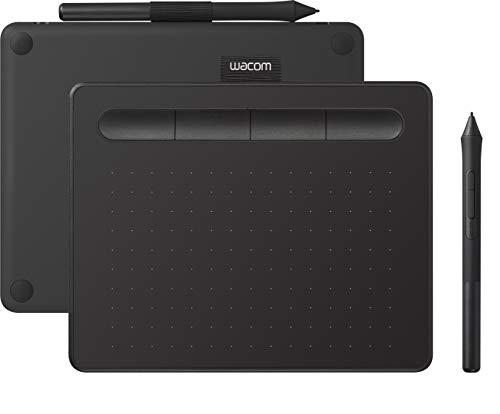
Wacom Intuos CTL-4100
Wacom Intuos CTL-4100
₹5,999–6,499. 4096 pressure levels (less than competitors at half the price), 152 × 95 mm active area, 4 express keys, Bluetooth + USB-C, best-in-class EMR pen feel, Wacom driver gold standard on all Indian Windows installs. Includes Clip Studio Paint 3-month trial and Corel Pain
Official India stock. Full warranty through the brand's India service network, standard RMA if anything goes wrong.
Full specs
Where to buy Wacom Intuos CTL-4100 in India
Expect to pay roughly ₹6,000-6,600 for the Wacom Intuos CTL-4100 in India right now, depending on offers and seller. I always recommend buying from retailers that give a proper GST invoice - it's what makes your India warranty claim smooth later.
Affiliate links on linked vendors - your price stays the same. PrimeABGB shown for comparison only.
In my years running a PC store, PrimeABGB (Mumbai) and Vedant Computers (Kolkata) have also been consistently reliable for verified stock - compare before buying.
Wacom Intuos CTL-4100 Price in India - Premium Pen Feel Drawing Tablet 2026
The Best Pen Feel at This Price - With One Genuine Embarrassment
The Wacom Intuos CTL-4100 costs ₹5,999–6,499 in India. At that price, Huion and XP-Pen give you 8192 pressure levels, larger active areas, and comparable or better hardware specs on paper. Wacom gives you 4096 pressure levels on a 152 × 95 mm active area.
The fact that Wacom charges ₹6,000 for 4096 pressure levels in 2026 - when competitors offer 8192 at ₹3,500 - is, frankly, hard to defend on spec sheets alone. I'm going to be direct about this because I've seen too many Indian buyers feel confused when they discover that the premium brand gives them fewer pressure levels. The confusion is warranted. The spec is genuinely disappointing at this price.
And yet I still recommend the CTL-4100 in specific situations, because the pressure spec number does not tell the whole story.
₹5,999–6,499. 4096 pressure levels (less than competitors at half the price), 152 × 95 mm active area, 4 express keys, Bluetooth + USB-C, best-in-class EMR pen feel, Wacom driver gold standard on all Indian Windows installs. Includes Clip Studio Paint 3-month trial and Corel Painter Essentials. Warranty via Acro Engineering - fastest tablet warranty service in India. You're paying for driver reliability, pen consistency, and Bluetooth convenience. If none of those things matter to you, buy the Huion H610 Pro V2 instead and save ₹2,000.
Value Comparison: What ₹6,000 Actually Buys You
The chart shows the problem clearly. On hardware specs - pressure levels and active area - the CTL-4100 is behind both competitors at a higher price. Where Wacom wins is driver quality and warranty service speed, which are not spec-sheet numbers.
Here is what Wacom's 4096 pressure implementation actually delivers over competitors' 8192: the CTL-4100's Initial Activation Force is approximately 1 gram - the lightest in this comparison. The Huion H610 Pro V2 and XP-Pen Deco 01 V2 sit at approximately 3 grams. That 2-gram difference determines how a very light touch registers. Wacom's pen starts producing a mark at 1 gram of pressure; Huion and XP-Pen require 3 grams before the first mark appears. For artists who work with very thin, delicate lines - technical illustration, fine linework, precise lettering - the Wacom feel is better. For everyone else drawing normal strokes, the difference is irrelevant.
Bluetooth: The CTL-4100 connects via Bluetooth 4.0 in addition to USB-C. In practice this means no cable trailing across your desk, which is more useful than it sounds if you draw on a small workspace or want to move the tablet without unplugging anything. Competitors in this price range do not offer Bluetooth. If you're someone who finds cable management annoying - and in a cluttered Indian desk setup with a keyboard, mouse, speakers, and phone charger already competing for USB ports - Bluetooth is genuinely nice.
Driver and Software Reality in India
The Wacom driver is the most reliable drawing tablet driver on Windows. It installs cleanly on every Indian Windows 11 and Windows 10 configuration I've encountered, including those with third-party software bundles, regional Windows installs, and OEM builds from Lenovo and HP that often have aggressive power management settings that cause Huion's driver to drop pressure periodically.
The free software bundle is real and usable: Clip Studio Paint 3-month trial (full version, not a lite version) is worth ₹1,000–1,500 on its own at normal subscription pricing. Corel Painter Essentials is a stripped-down version of Corel Painter - adequate for beginners but not a professional tool. If you're getting into digital art and haven't settled on software, the Clip Studio trial is a useful 3 months to decide.
Wacom's driver does not conflict with Huion or XP-Pen drivers if you install them simultaneously - unlike the reverse situation, where Wacom's legacy drivers can interfere with Huion. This matters if you use a Wacom at home and a shared Huion at a college lab.
India Pricing, Availability, and Warranty
₹5,999–6,499 on Amazon India, Flipkart, and MDComputers. PrimeABGB and Vedant Computers carry the CTL-4100 consistently. At this price, it is competing with upper-tier Huion and XP-Pen models that have more hardware on paper.
Warranty through Acro Engineering is the best drawing tablet warranty experience available in India. Acro Engineering is Wacom's official Indian distributor and handles warranty claims directly - walk-in service in major cities, courier pickup in others. Turnaround is roughly 1 week compared to 2–4 weeks for Amazon-seller-based Huion and XP-Pen claims. If you rely on your tablet for professional income and cannot be without it, Acro Engineering's speed has real value. If you're a student who can survive a few weeks without the tablet, it's less relevant.
GST at 18% is included in the listed price. This is the Indian retail price, not a grey import - Acro Engineering is the official channel and the warranty is fully valid.
Who Should Buy This / Who Should Skip It
Buy it if: Driver reliability is your priority. You've had frustrating experiences with Huion or XP-Pen drivers - dropped pressure, conflicts with other software, erratic behavior after Windows updates. Wacom's driver simply does not do those things. Also buy it if Bluetooth genuinely matters to you for desk cable management, or if you're a professional whose tablet failure would cost you client work and Acro Engineering's 1-week warranty turnaround is worth the premium.
Skip it if: You're buying on hardware specs. At ₹6,000, the CTL-4100 cannot compete with the Huion H610 Pro V2 on pressure levels or active area. If you're a student or hobbyist who draws illustrations and needs the largest comfortable workspace within budget, save ₹2,000 and get the Huion. The driver is stable enough - just uninstall any old Wacom drivers first.
Price we have actually seen
No change while tracked. Every point is a price our crawler recorded at an Indian retailer - no estimates, no MSRP. Tracking began recently, so the window grows week by week.
Questions
Wacom's position is that their pressure curve implementation and IAF produce better real-world results than a higher raw number with different tuning. There is truth in this - the ~1g IAF and curve consistency at low pressure are genuinely better - but the justification wears thin when the gap in spec and price is this large. It's partly legacy pricing power. Wacom has the brand, the driver ecosystem, and the industry standard status built up over 20 years, and the CTL-4100 pricing reflects that more than the hardware justifies.
This is an unusual but real question in Indian creative work - using a tablet with IME input for Devanagari or Tamil text in design software. The tablet functions normally alongside any Windows IME; there are no known conflicts. The tablet handles pen input; keyboard/text input is handled by Windows separately.
Yes. Clip Studio Paint 3-month trial and Corel Painter Essentials are redeemed via codes included in the box. The redemption servers are global and work from Indian IP addresses. The Clip Studio trial is the full desktop version - all brushes, tools, and features active for 3 months.
In India, the standard CTL-4100 is the primary retail version. The "WL" suffix in some markets denotes wireless (Bluetooth) models, but Wacom India sells the Bluetooth version under the standard CTL-4100 name. Verify the listing description says Bluetooth if that's important to you - some older stock (pre-2025) was USB-only.