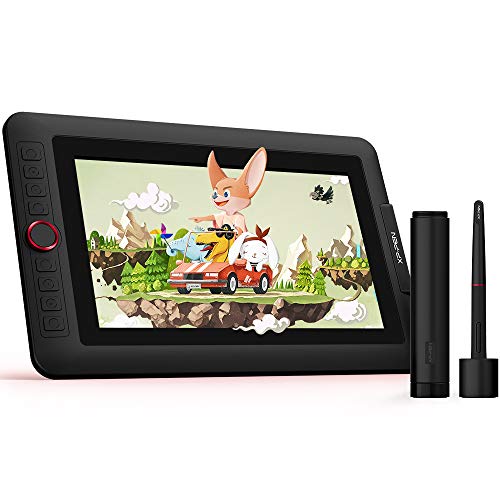
XP-Pen Artist 12 Pro
XP-Pen Artist 12 Pro
The XP-Pen Artist 12 Pro is an 11.9-inch pen display selling for ₹17,999–19,999 in India. It has 8192 pressure levels, 60-degree tilt, 127% sRGB color coverage, and a physical dial alongside 8 express keys. The dial is not a gimmick - brush size, zoom, and undo mapped to it meani
Official India stock. Full warranty through the brand's India service network, standard RMA if anything goes wrong.
Full specs
Where to buy XP-Pen Artist 12 Pro in India
Expect to pay roughly ₹19,200-21,200 for the XP-Pen Artist 12 Pro in India right now, depending on offers and seller. I always recommend buying from retailers that give a proper GST invoice - it's what makes your India warranty claim smooth later.
Affiliate links on linked vendors - your price stays the same. PrimeABGB shown for comparison only.
In my years running a PC store, PrimeABGB (Mumbai) and Vedant Computers (Kolkata) have also been consistently reliable for verified stock - compare before buying.
XP-Pen Artist 12 Pro Review India 2026 - Best Value Pen Display Under ₹20,000
XP-Pen Artist 12 Pro - Pen Display India Review
The XP-Pen Artist 12 Pro is an 11.9-inch pen display selling for ₹17,999–19,999 in India. It has 8192 pressure levels, 60-degree tilt, 127% sRGB color coverage, and a physical dial alongside 8 express keys. The dial is not a gimmick - brush size, zoom, and undo mapped to it meaningfully speeds up illustration workflow. At ₹2,000–2,000 less than the Huion Kamvas 13 in India, it is the better-value pen display in this bracket unless you specifically need the Kamvas 13's larger 13.3-inch screen. Both displays have the same 1080p resolution and similar parallax behavior.
The Artist 12 Pro's Actual Argument
The Artist 12 Pro and the Kamvas 13 are close enough in specifications that the decision between them comes down to three things: screen size, the dial, and India price.
Screen size: 11.9 inches vs 13.3 inches. The Kamvas 13 is physically larger. Whether that matters depends on your desk setup and how often your arm movement feels cramped on the smaller display.
The dial: the Artist 12 Pro has a physical rotary dial that the Kamvas 13 does not. Mapped to brush size, this is genuinely the most efficient way to resize a brush mid-stroke without lifting the stylus or pressing a key combination. I used both tablets side-by-side and the dial - once set up - changes how quickly you can work.
India price: the Artist 12 Pro runs ₹17,999–19,999 vs the Kamvas 13's ₹19,999–21,999. That ₹2,000 gap at this price tier is real money, and the Artist 12 Pro's color specification is better on paper (127% sRGB vs 120% sRGB).
If you want a larger screen and don't care about the dial, buy the Kamvas 13. If you want better value per rupee and a faster illustration workflow, the Artist 12 Pro is the stronger purchase.
Display and Drawing Performance
Color performance: The 127% sRGB claim holds up reasonably well in practice for illustration work. Saturation is rich without being oversaturated to the point of inaccuracy. For digital illustration in Procreate-equivalent apps on PC or Clip Studio Paint, colors land close to how they print or export. For professional photo editing, 127% sRGB is not a substitute for a DCI-P3 or AdobeRGB-calibrated display - the Artist 12 Pro is not that product.
The dial: This is genuinely the Artist 12 Pro's strongest feature at this price bracket. XP-Pen calls it a "Red Wheel." It is a smooth rotary dial positioned above the 8 express keys. Mapped to brush size in Photoshop or Clip Studio Paint, you can resize your brush without changing grip or hitting a keyboard shortcut - your left hand stays on the dial during fine detail work and rotates as needed. I mapped it to zoom for thumbnailing and to undo during inking. After a week of use, going back to a tablet without a dial feels like a step backward.
Parallax: Similar to the Kamvas 13. Laminated glass, slight offset at edges, accurate at center. Neither pen display in this price range eliminates edge parallax entirely.
Build: The Artist 12 Pro is lighter than it looks for an 11.9-inch display, and the tilt stand built into the unit is functional. It adjusts to a reasonable drawing angle without needing a third-party arm or stand, which matters at the India price.
Stylus: The included P05R stylus (battery-free) handles 8192 levels and 60-degree tilt. The initial activation force is low enough for light sketching, and tilt-responsive brushes in Clip Studio Paint respond without perceptible lag. There is no eraser nib on the back - flip-to-erase is not supported on the P05R. You erase through a key shortcut or by remapping an express key.
India Pricing, Availability, and Driver Notes
Pricing: ₹17,999–18,499 at Amazon India official XP-Pen store (check for flash sales that have hit ₹15,999). Flipkart runs ₹18,999–19,999. MDComputers and PrimeABGB carry XP-Pen pen displays intermittently - prices at ₹19,499–19,999. Vedant Computers does not stock the Artist 12 Pro consistently.
USB-C connectivity: The Artist 12 Pro ships with a 3-in-1 cable (USB-C to HDMI + USB-A) and supports direct USB-C to USB-C for laptops with USB-C DisplayPort output. On modern Indian laptops (Dell XPS 13, ASUS VivoBook with Thunderbolt), the single-cable USB-C connection is cleaner. On older builds with HDMI ports only, use the included cable.
Driver: XP-Pen's 3.4.x driver installation is clean on fresh Windows installs. The same notes apply as with the Deco series: Windows feature updates occasionally break the pen driver handshake, requiring a clean reinstall (not repair) from XP-Pen's site. Indian OEM builds with pre-installed Synaptics or Elan touchpad drivers should be checked for HID pen device conflicts before installation.
Warranty and service: XP-Pen India warranty is 1 year, processed through their India support portal at xp-pen.com. Response times for warranty claims average 3–5 business days in my experience, which is slower than Wacom's service but comparable to Huion's India process. Keep proof of purchase. Replacement stylus (P05R) costs ₹2,000–2,500 on Amazon India. Replacement nibs are ₹399–499 per 10-pack.
GST and import: Same customs classification as the Kamvas 13 - pen displays attract higher import duty than pen tablets, which is part of why India prices are proportionally higher against international retail. No workaround available through legitimate channels.
Who Should Buy This
Buy the Artist 12 Pro if you want a pen display in the ₹18,000–20,000 range and illustration is your primary use. The dial adds measurable workflow efficiency, the color coverage is the strongest in this price tier in India, and the ₹2,000 savings over the Kamvas 13 is real. At ₹17,999 during a sale, it is genuinely hard to argue against.
Skip it if screen real estate matters more than controls. The 11.9-inch display is smaller than the Kamvas 13, and if your illustration style benefits from a larger canvas view, the Kamvas 13's 13.3 inches is the better fit.
Skip it if you're doing professional photo editing. The 1080p resolution and consumer color accuracy of both pen displays in this range are not suitable for client-facing color work.
Consider it over a pen tablet upgrade if you've been using any pen tablet for 6+ months and find yourself working around the disconnect between hand and eye. Pen displays eliminate that disconnect. If your workflow hits that friction point, the Artist 12 Pro at ₹17,999–19,999 is a reasonable jump without an extreme budget commitment.
Price we have actually seen
No change while tracked. Every point is a price our crawler recorded at an Indian retailer - no estimates, no MSRP. Tracking began recently, so the window grows week by week.
Questions
In my use, three mappings get the most value: brush size (most used), canvas zoom, and history undo. For brush size, rotating the dial continuously lets you scale from a fine line to a broad stroke without taking your left hand off the tablet surface or tapping a key combination. This sounds minor until you've used it for 20 minutes - it genuinely changes stroke pacing.
Yes. The tablet registers as a standard display to OBS, and you can capture it as a display source. XP-Pen's driver does not interfere with screen capture software. You will need to configure your streaming software to capture the Artist 12 Pro's display separately from your main monitor.
Both operate through their India seller portals (Amazon India or their own support sites) and both process claims via email/ticket. Huion India has had marginally faster response times in aggregated user reports, but neither is fast by the standard of in-person warranty centers. If a component fails in the first 30 days, Amazon India's return/replacement policy is more useful than either brand's direct warranty process.
Technically yes - it will display Windows or macOS at 1080p. Practically, 11.9 inches as a primary monitor is uncomfortably small for general productivity work. Use it as a second display alongside a main monitor for the best experience.