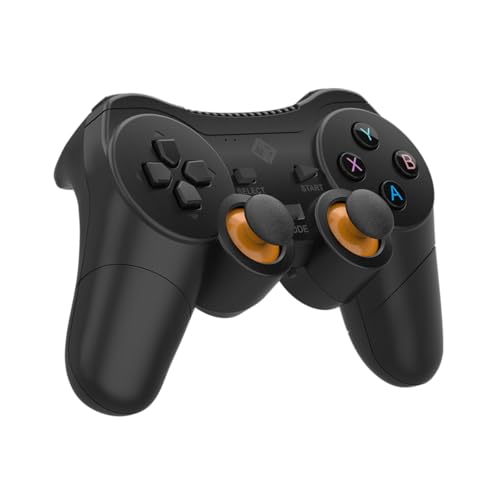
Cosmic Byte Nexus Wireless Controller
Cosmic Byte Nexus Wireless Controller
The cheapest wireless controller worth considering in India, perfect for casual hostel gamers who prioritise no-cable freedom over precision.
Official India stock. Full warranty through the brand's India service network, standard RMA if anything goes wrong.
Full specs
Where to buy Cosmic Byte Nexus Wireless Controller in India
Expect to pay roughly ₹900-1,000 for the Cosmic Byte Nexus Wireless Controller in India right now, depending on offers and seller. I always recommend buying from retailers that give a proper GST invoice - it's what makes your India warranty claim smooth later.
Affiliate links on linked vendors - your price stays the same. PrimeABGB shown for comparison only.
In my years running a PC store, PrimeABGB (Mumbai) and Vedant Computers (Kolkata) have also been consistently reliable for verified stock - compare before buying.
Cosmic Byte Nexus Wireless Controller Review: Budget Gaming Controller Chaos Solved Under ₹900 in India? (2026)
Cosmic Byte Nexus Wireless Controller Review: Budget Gaming Controller Chaos Solved Under ₹900 in India? (2026)
Picture this: you're a college student, you've just moved into a hostel room with a small desk barely big enough for your laptop and a water bottle. Your friend told you to get a controller for FIFA and GTA. You're excited, but your budget is tight after paying semester fees, and you've set a hard limit of ₹1,000. You definitely want wireless, because a cable across that tiny desk is going to be a constant tangle-and-yank annoyance. You've opened Amazon and you're scrolling, slightly overwhelmed by the sheer number of "gaming controllers" that may or may not actually work with your laptop.
This is the exact scenario the Cosmic Byte Nexus is made for. At roughly ₹825, it is one of the very few wireless controllers in India that costs under ₹1,000 and is actually worth buying. Not perfect, not premium, but honest about what it is and who it serves.
How the Nexus Addresses the Hostel Gamer Problem
The core selling point is simple: wireless at ₹825 is genuinely rare. Most controllers at this price are wired, and the few wireless ones that show up cheaper are either unbranded units with no real PC compatibility or clones with latency bad enough to make FIFA feel like a slideshow.
The Nexus connects via Bluetooth and is compatible with PC (Windows) and Android. For hostel gaming, Android compatibility is a bonus because a lot of students also play via phone when the laptop is busy. The dual-vibration motors are functional and give you basic rumble feedback in supported games. At ₹825, having vibration at all is a genuine plus.
The AAA battery design is an interesting choice that I want to address directly, because it's the feature that most reviews treat as a negative without thinking it through. Yes, you will spend money on batteries over time. Two AAA batteries run you about ₹60–80 for a decent alkaline pair (Duracell or Eveready), and you'll go through them every 12–15 hours of play. That adds a small ongoing cost. But here is the hostel angle: when you're deep into a late-night GTA session and your rechargeable controller hits 0%, you need a charging cable you probably can't find right now, and you wait 90 minutes. With AAA batteries, you walk to the corridor canteen, spend ₹30 on a replacement pair, and you're back in under three minutes. No charging downtime, no cable dependence, no waiting. For casual hostel gaming sessions that happen whenever they happen, this is actually more practical than it sounds.
Features Through the Use-Case Lens
The Nexus has a standard dual-analog layout matching Xbox convention: A/B/X/Y face buttons, a D-pad, two analog sticks, left and right bumpers, and LT/RT triggers. The layout is immediately familiar to anyone who has used an Xbox controller or played FIFA on a console at a friend's place.
PC compatibility is via generic HID Bluetooth. This means it is not XInput natively, so Steam's direct XInput auto-detection won't fire the way it would with an Xbox controller. You can map it through Steam Input or DS4Windows, both of which are free. It's one extra setup step that takes about five minutes and works reliably once done.
Android compatibility is Bluetooth plug-and-play for most games including FIFA Mobile, COD Mobile, and emulators. No drivers or configuration needed there.
The build is plastic throughout. The grip texture on the handles is adequate, nothing premium. The triggers have a reasonable travel depth for the price. The sticks are standard potentiometer-based joysticks, not Hall Effect, which means they will eventually develop drift after extended use. At this price point that is the honest trade-off: Hall Effect joysticks start appearing in controllers costing ₹2,000 and above.
Where It Falls Short
The Bluetooth connection is its biggest practical limitation compared to a 2.4GHz dongle controller. Bluetooth input latency is higher than 2.4GHz wireless. For FIFA, GTA, or casual adventure games, the difference is essentially invisible. For any fast-paced game where timing is critical, you will feel it. This is a hard engineering constraint at the price point: a 2.4GHz dongle solution costs more to manufacture.
The sticks, as mentioned, are standard potentiometers. Expect drift to develop after 200+ hours of heavy use. That's a realistic lifespan of 6–12 months for a daily gamer. For a casual weekend player, it could last 2–3 years or more.
There is no built-in rechargeable battery. This means the controller is lighter than rechargeable alternatives (a genuine benefit for long sessions) but requires ongoing battery purchases. Budget ₹200–300 per year for AAA replacements if you game 3–4 hours per week.
PC setup requires one-time configuration via Steam Input or DS4Windows since the Nexus uses generic HID Bluetooth rather than native XInput.
India Market: Pricing, EMI, and Where to Buy
The Nexus sits at ₹749–₹899 on Amazon India depending on sale cycles. Amazon's No-Cost EMI kicks in at orders above ₹1,500 for most cards, so this controller won't qualify on its own. However, if you're buying a controller alongside other hostel or gaming essentials, bundling the order past that threshold gets you the EMI option. Flipkart sometimes lists it marginally cheaper during Big Billion Days and Diwali sales.
For Indian gaming cafes and LAN events, the Nexus makes occasional appearances as a spare controller on Android-connected setups. It isn't the primary controller at PC gaming cafes, which usually run Xbox controllers or DualSenses, but for casual mobile tournament setups, the Bluetooth Android compatibility is used practically.
The warranty is 1 year through Cosmic Byte's Indian service network, which is distributed by Amkette. This matters: Indian warranty means you are not shipping a ₹825 controller internationally for a claim. Amkette has walk-in service centres in major cities and a functional replacement process for defective units.
Cosmic Byte products are listed on Amazon India with official seller fulfilment. Avoid third-party marketplace listings at ₹599 or below, as the budget controller category has a documented cloning problem.
Value Rating
Who It's For vs Who Should Look Elsewhere
The Cosmic Byte Nexus is the right controller if you are a college student or early-career gamer in India with a sub-₹1,000 budget who wants wireless and plays casual games: FIFA, GTA, adventure titles, or mobile emulation on PC. It is also a practical choice if you want a spare or secondary controller for a friend joining a session, where spending ₹5,000 on a guest controller makes no sense. Android mobile gamers who want Bluetooth controller support for COD Mobile or emulators will find the Nexus does the job without any app or driver setup.
Look elsewhere if you play anything requiring precision input: any racing simulator, rhythm game, competitive shooter with controller support, or action game where analog stick accuracy is load-bearing. At this price, the sticks simply are not calibrated to that standard, and they never will be. The Cosmic Byte C3070W at ₹1,499–1,799 gives you a meaningfully better experience, and the Cosmic Byte ARES at ₹1,399 adds USB-C charging and a 2.4GHz dongle for tighter latency. If your budget can stretch past ₹1,000 at all, consider those options first.
Also look elsewhere if you game heavily every day. The ongoing AAA battery cost will add up, and the potentiometer sticks will develop drift faster under heavy use. A rechargeable controller at ₹1,500+ will have lower long-term cost of ownership.
Price we have actually seen
Down 3.2% since we started tracking. Every point is a price our crawler recorded at an Indian retailer - no estimates, no MSRP. Tracking began recently, so the window grows week by week.
Questions
Yes, it connects via Bluetooth so no dongle is needed. Pair it through Windows Bluetooth settings. For game compatibility, use Steam Input or DS4Windows to map it as an XInput device. The one-time setup takes about five minutes.
Roughly 12–15 hours of active play with dual vibration enabled. Turning off vibration in game settings extends this noticeably. Two Duracell or Eveready AAA batteries run about ₹50–80, so the per-session cost is low.
The Redgear Pro Series Wired offers a more stable XInput connection and slightly better build quality at roughly the same price tier. The Nexus wins on wireless freedom. If your desk setup has a cable tangling problem, the Nexus is worth it. If you game at a fixed desk and latency matters more than cable management, the wired Redgear is a reasonable alternative.