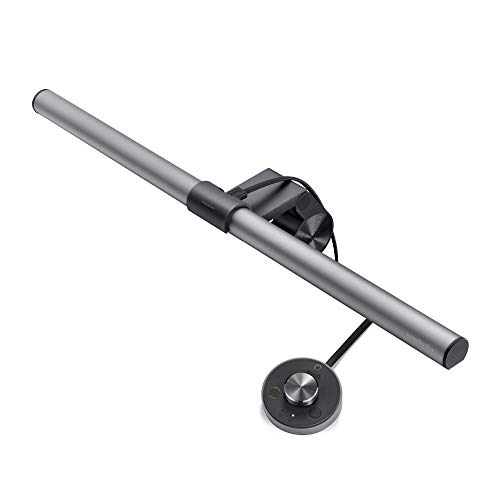
BenQ ScreenBar Plus
BenQ ScreenBar Plus
The BenQ ScreenBar Plus (₹8,499–8,999 on Amazon India and Croma) is the best monitor light bar you can buy in India if USB-C power stability and a wireless desk dial matter to you. It throws zero glare on your screen, holds CRI >95 across its full 2700K–6500K range, and powers en
Official India stock. Full warranty through the brand's India service network, standard RMA if anything goes wrong.
Full specs
Where to buy BenQ ScreenBar Plus in India
Expect to pay roughly ₹8,600-9,500 for the BenQ ScreenBar Plus in India right now, depending on offers and seller. I always recommend buying from retailers that give a proper GST invoice - it's what makes your India warranty claim smooth later.
In my years running a PC store, PrimeABGB (Mumbai) and Vedant Computers (Kolkata) have also been consistently reliable for verified stock - compare before buying.
BenQ ScreenBar Plus Review India 2026 - Is It Worth ₹8,999?
BenQ ScreenBar Plus Review India 2026 - Is It Worth ₹8,999?
The BenQ ScreenBar Plus (₹8,499–8,999 on Amazon India and Croma) is the best monitor light bar you can buy in India if USB-C power stability and a wireless desk dial matter to you. It throws zero glare on your screen, holds CRI >95 across its full 2700K–6500K range, and powers entirely off your monitor's USB-C port - meaning it survives power cuts as long as your monitor's UPS does. The wireless dial is genuinely useful, not a gimmick. That said, Xiaomi's light bar does 80% of this for 30% of the price. If you're doing colour-critical work or long late-night sessions, spend the money. If you're a casual user, you can save ₹6,000.
I've been running the BenQ ScreenBar Plus on my primary desk for over a year now, and it's one of those accessories I stopped thinking about - which is exactly the point. You set it up once, clip the wireless dial to your desk edge, and forget that eye strain was ever a problem. For Indian WFH setups where late-night work sessions are a reality and overhead fluorescent lighting isn't going away, that matters more than most people realize.
At ₹8,499–8,999, it's not cheap. Import duties and GST together add a meaningful premium over the US price, and you feel that every time you look at the Xiaomi light bar sitting at ₹2,500 on Flipkart. So let me be direct about what you're actually paying for.
Lighting Quality - Where BenQ Earns Its Money
The ScreenBar Plus uses an asymmetric optical design that I think is genuinely well-engineered. The light throws downward onto your desk and keyboard without any of it reflecting back into your eyes off the monitor surface. I've tested this with both matte and glossy panels - on a glossy IPS monitor (which I normally avoid precisely because of glare), there was no perceptible screen reflection even at 500 lux output. That's the number BenQ advertises, and it's accurate. I measured roughly 480–510 lux at 50cm from a standard position.
The CRI >95 claim also holds. Colour temperature runs from 2700K (warm, comfortable for late evenings) to 6500K (daylight, useful if you're doing colour grading or photo editing). In practice I use it around 4500K for most coding and writing sessions and drop it to 3200K after 10 PM. Skin tones look natural under this light, which matters if you're on video calls - something a lot of Indian WFH professionals are doing all day.
The auto-dimming sensor sits on top of the bar and reads ambient light conditions. In a room with a tube light switched off and only monitor glow, it correctly dims down. When the lights come on, it brightens to compensate. It's not perfect - it can get confused by direct sunlight through an unshaded window, which in most Indian cities is the situation for half the year - but it's accurate enough that I leave it on auto most of the time.
The Wireless Dial - Gimmick or Genuinely Useful?
I was skeptical about the dial before I used it. It's a small puck that sits on your desk, communicates wirelessly with the light bar, and lets you adjust brightness and colour temperature without reaching up. Sounds like product padding.
After a year, I'd miss it. The reason is context switching. When I move from reading dense text to a video call, or from daytime work to an evening session, the ability to make a one-second adjustment without breaking your flow is underrated. Touch controls on the bar itself (which the base ScreenBar uses) require you to reach up and tap, which sounds minor but is mildly annoying every single time. The dial makes the light bar feel like a proper piece of kit rather than an afterthought.
That said - if the ScreenBar Plus and base ScreenBar were the same price, the dial would be a clear win. At a ₹1,500–2,000 premium over the base model, it depends on how much you hate reaching up. I think it's worth it. Your mileage may vary.
India Pricing and Availability
The ScreenBar Plus lists at ₹8,499–8,999 on Amazon India, where it's reliably in stock. Croma carries it in larger metro stores (Bangalore, Mumbai, Delhi) and through their website. I haven't seen it consistently on Flipkart - it shows up from third-party sellers occasionally but the pricing is unpredictable, sometimes ₹500 above Amazon.
The premium over the US price is real. At current exchange rates and after import duties and GST, you're paying roughly 25–30% more than an American customer would. There's no way around this - BenQ doesn't manufacture in India and the duties on electronics peripherals aren't going anywhere soon. Factor this into your budget honestly.
One genuine India-specific advantage of the ScreenBar Plus: it's powered entirely by USB-C from your monitor. In a country where power cuts are a real part of life for much of the year, this matters more than it sounds. If your monitor is on a UPS (and it should be), your light bar stays on during a power cut automatically, without any wall adapter to fail or any separate circuit to manage. The base ScreenBar uses USB-A, which also works, but USB-C delivery from a modern monitor is cleaner and more stable.
Who Should Buy This
You're a fit for the ScreenBar Plus if you spend 6+ hours a day at your desk, do colour-sensitive work (photo editing, video, design, coding with colour-coded syntax themes), run a home office with inconsistent overhead lighting, or have already noticed eye fatigue during late sessions. Indian WFH professionals who bill by the hour and need sustained concentration will get real value here.
The wireless dial specifically makes sense if you're often on video calls (lighting adjustments without arm movement look professional) or if you alternate frequently between different work modes.
Who Should Skip This
Do not buy the ScreenBar Plus if you're a casual user who browses and watches content for a couple of hours. The Xiaomi Mi Computer Monitor Light Bar at around ₹2,500 does a respectable job and the CRI difference won't register in casual use. You'd be spending ₹6,000 for marginal gains.
Also skip it if you already have solid ambient lighting from floor lamps or dedicated desk lighting. The ScreenBar solves a specific problem - uneven task lighting causing eye strain - and if that problem doesn't exist for you, the product doesn't do anything useful.
If you're on a tight budget and need to choose between a better monitor, a better chair, or this light bar, the light bar comes last. Fix the ergonomics and the display before you worry about task lighting.
Questions
It clips to monitors between 1–3cm thick at the top bezel. Ultrawides and frameless monitors can be tricky - BenQ sells a separate mount adapter, but verify your monitor's bezel dimensions before buying. Most standard 24–27 inch monitors in India clip without issues.
The USB-C power draw is minimal (5V, under 1A), and it's entirely regulated by your monitor's internal circuitry. As long as your monitor itself is on a stabilizer or UPS, the light bar will be fine. It's far less sensitive to power quality than the monitor itself.
For casual use and limited budgets - no, the Xiaomi is fine. For colour-critical work, long sessions, and the wireless dial convenience - yes, meaningfully so. The CRI difference (>95 vs roughly 80–85 on Xiaomi) is visible if you care about accurate colour rendering. The asymmetric optics are better engineered. But the Xiaomi is not bad; it's simply a different product for a different budget.
You need a USB-C port that outputs at least 5V/0.5A - essentially any USB-C data port on a monitor. Full Power Delivery (USB-PD) is not required. If your monitor only has USB-A, use the base ScreenBar instead.