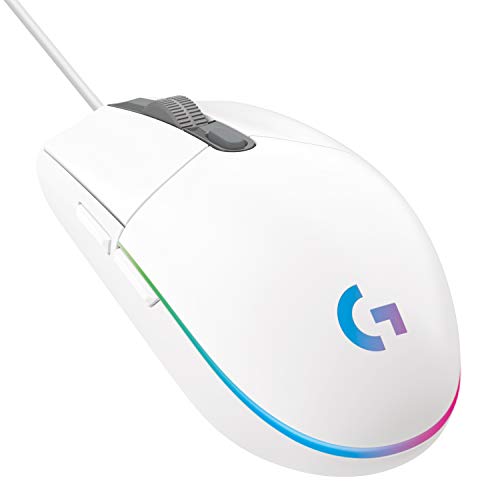
Logitech G102 LIGHTSYNC
85g wired mouse, Logitech Mercury (8K DPI optical), 8,000 DPI, 1000Hz polling.
Default budget gaming mouse recommendation in India. Omron switches, 1000Hz polling, clean sensor. 2-year Logitech warranty. Nothing at this price comes close for competitive gaming.
Official India stock. Full warranty through the brand's India service network, standard RMA if anything goes wrong.
Full specs
Where to buy Logitech G102 LIGHTSYNC in India
Indicative catalogue range: ₹1,300-1,500 for the Logitech G102 LIGHTSYNC. This is not a verified current retailer price. Confirm price and availability with the seller and buy with a proper GST invoice for warranty claims.
Affiliate links on linked vendors - your price stays the same. PrimeABGB shown for comparison only.
In my years running a PC store, PrimeABGB (Mumbai) and Vedant Computers (Kolkata) have also been consistently reliable for verified stock - compare before buying.
Logitech G102 LIGHTSYNC Gaming Mouse Review India 2026 - Best Wired Mouse Under ₹1,600?
Logitech G102 LIGHTSYNC Gaming Mouse - India Review 2026
If someone tells me they need a gaming mouse and their budget is under ₹1,500, I tell them to stop scrolling and buy the G102. Not because it's perfect - it isn't - but because everything that matters for competitive gaming is handled correctly, and nothing else at this price comes close.
How It Actually Performs
The G102 uses Logitech's Mercury sensor (not the HERO), rated to 8,000 DPI with 1,000 Hz polling rate via USB. In practice, the tracking is clean at gaming-relevant DPI settings - 400 to 1600 - with no acceleration and predictable behavior. It's not a zero-spin sensor and doesn't pretend to be. At the speeds most Valorant or BGMI players operate, you will not notice sensor limitations.
The primary clicks use Omron switches rated to 10 million clicks. The actuation is crisp and consistent - better than any mouse I've used at a similar price from brands like Zebronics or Cosmic Byte. The scroll wheel has satisfying tactile steps, the side buttons are responsive, and the rubber coating on the sides holds up through sweaty gaming sessions without turning greasy quickly.
At 85g, the G102 is lighter than it looks. The cable is a braided 2.1m rubber cable - not a flexible paracord, but not the stiff dragging cable you get on office mice either. On a cloth mousepad, cable drag is manageable. If you're competitive and hate cable feel, a bungee helps; see the accessories section at /accessories/mice/.
RGB works across the scroll wheel and front logo with six zones that you can customize in G HUB. The default rainbow cycle is fine if you never install the software. The lighting is bright enough to see in a lit room, not so bright it bleeds onto your desk excessively.
India Pricing and Availability
The G102 retails at ₹1,399 (indicative) in India as of June 2026. Amazon India and Flipkart are the most reliable sources - both offer fast delivery and Amazon's fulfilled listings come with easy returns. MDComputers and Vedant Computers also stock it. At Croma, pricing can creep up to ₹1,700–1,800, so check the online prices first.
Warranty is 2 years through Logitech India (Rashi Peripherals). Service centers exist in major metro cities. For tier-2 cities, most warranty claims are handled via courier - Logitech's process has improved significantly over the last two years.
The mouse is priced after 18% GST and is a legitimately affordable product, not a dumped item. Logitech has kept this price point intentionally competitive because the Indian market is large and price-sensitive. That said, sale discounts are real - ₹1,100–1,200 during Amazon sales is not unusual.
Who Should Buy the G102
Buy this if you're building your first gaming PC and need a mouse that won't embarrass you in an FPS. Buy it if you're a student who games competitively but can't justify spending ₹2,500+ on a peripheral yet. It's also a solid choice for someone upgrading from a ₹300 office mouse for the first time - the difference in click feel alone will be noticeable.
The G102 pairs well with entry-level and mid-range builds. See /builds/T01 for the base gaming rig this mouse complements, or /builds/T02 for a step-up build.
Who Should Skip the G102
Skip it if you want wireless. There's no wireless version of the G102 - for that, you're looking at the G304 at roughly double the price.
Skip it if you have very large hands and palm grip. Like the G304, the G102 is on the smaller side - 116mm long, 62mm wide. If your hand is above 19cm, you'll want something bigger.
Skip it if you play on very high DPI (3,200+) and need pixel-perfect tracking. The Mercury sensor handles high DPI fine but isn't the last word in sensor quality. If you're hitting high-level competitive play and sensor performance genuinely matters, the SteelSeries Rival 3 or Razer DeathAdder Essential both bring better sensors.
Price we have actually seen
Hover or tap the chart for a recorded price. Use ← → when focused.
View all recorded prices
| Date | Price |
|---|---|
| ₹1,395 | |
| ₹1,395 | |
| ₹1,395 | |
| ₹1,395 | |
| ₹1,395 | |
| ₹1,395 | |
| ₹1,395 | |
| ₹1,395 | |
| ₹1,095 | |
| ₹1,095 | |
| ₹1,095 | |
| ₹1,095 | |
| ₹1,095 | |
| ₹1,095 | |
| ₹1,095 | |
| ₹1,095 | |
| ₹1,095 | |
| ₹1,095 | |
| ₹1,095 | |
| ₹1,095 | |
| ₹1,095 | |
| ₹1,095 | |
| ₹1,095 | |
| ₹1,095 | |
| ₹1,095 | |
| ₹1,095 | |
| ₹1,095 | |
| ₹1,095 | |
| ₹1,095 | |
| ₹1,095 |
Down 21.5% since we started tracking. Every point is a price our crawler recorded at an Indian retailer - no estimates, no MSRP. Tracking began recently, so the window grows week by week.
Questions
Yes, genuinely. The sensor tracks cleanly at 400–800 DPI, the clicks register consistently, and the weight is low enough to not fatigue during long sessions. Multiple Indian college tournament players I know use this as their primary mouse without complaint.
Poorly. Most optical sensors, including the Mercury in the G102, track inconsistently on glass or highly reflective surfaces. A cloth mousepad in the ₹300–600 range fixes this completely.
At similar prices, yes. The G102's Omron switches feel better, the sensor is cleaner, and Logitech's brand reliability in India is higher. The Redragon M711 has its own merits (more buttons, heavier feel) but for pure FPS gaming the G102 wins.
In my experience, two to three years of daily gaming use is typical before any degradation in click consistency. The Omron switches are rated to 10M clicks, which takes a long time to reach. The most common failure point is the cable near the connector - use a bungee or be careful with cable routing.