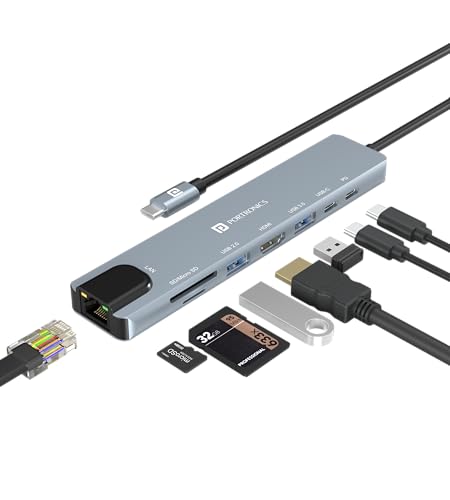
Portronics Mport 8 USB-C 8-in-1
8-port USB-C hub, 60W PD.
Best USB-C hub under ₹1,000 in India. 8-in-1 with HDMI, PD 60W, SD card. Portronics D2C via Amazon. Good for budget laptop docking. Not for heavy bandwidth tasks.
Official India stock. Full warranty through the brand's India service network, standard RMA if anything goes wrong.
Full specs
Where to buy Portronics Mport 8 USB-C 8-in-1 in India
Indicative catalogue range: ₹1,000-1,100 for the Portronics Mport 8 USB-C 8-in-1. This is not a verified current retailer price. Confirm price and availability with the seller and buy with a proper GST invoice for warranty claims.
Affiliate links on linked vendors - your price stays the same. PrimeABGB shown for comparison only.
In my years running a PC store, PrimeABGB (Mumbai) and Vedant Computers (Kolkata) have also been consistently reliable for verified stock - compare before buying.
Portronics Mport 8 USB-C 8-in-1 Hub Review India 2026 - Best Budget Hub Under ₹1,000?
Portronics Mport 8: The ₹849 Hub That Actually Does Its Job
At ₹849–999, the Portronics Mport 8 is gunning for anyone who bought a modern ultrabook and immediately ran out of ports. One USB-C port on your laptop, eight ports on this hub - that's the pitch. Whether it delivers is a different question.
I've had this on my desk for a few weeks now, connected to a thin-and-light running Windows 11. Here's what I actually found.
What You're Actually Getting
Eight ports sounds generous until you understand what they are. The Mport 8 includes: one HDMI 1.4 output (4K@30Hz or 1080p@60Hz), three USB-A 3.0 ports, one USB-C data port, one USB-C PD passthrough (up to 85W), an SD card slot, and a microSD slot.
The HDMI is 1.4, not 2.0. That matters. At 4K, you're locked to 30Hz - usable for a second monitor showing documents or reference, but not for any video work or gaming. At 1080p you get 60Hz, which is fine for most productivity setups. I'd say 90% of the people buying this hub are on 1080p external monitors anyway, so it's not the dealbreaker it sounds.
USB-A speeds are USB 3.0 - rated 5Gbps, real-world around 350–420 MB/s on a decent SSD. Not blazing, but perfectly adequate for a mouse, keyboard, external drive backup, or USB DAC.
The card reader is what surprised me positively. Both SD and microSD slots read simultaneously without bandwidth fighting each other - I moved 4K footage off a GoPro microSD at ~85 MB/s, which is close to the theoretical limit of a UHS-I card. For photographers or videographers doing quick imports, this works.
India Pricing and Where to Buy
I've seen the Mport 8 range from ₹849 to ₹999 depending on where you buy. Amazon India tends to hover around ₹849 during sales, while Flipkart often sits at ₹929–999. Physical availability at Croma is patchy - I'd call ahead before making the trip.
One thing worth flagging for India buyers: the hub is rated for 100–240V input on the PD passthrough path, so your Indian charger works fine. I've used it through brief voltage dips (we all know those) without any resets, which is reassuring. The shell is plastic, not aluminium, so heat dissipation is average - under normal use it stays warm but not hot.
Warranty is 1 year from Portronics India, and their service has improved significantly. If you buy from Amazon India with Portronics as the seller, returns and replacements are straightforward. Third-party sellers are a different story - check the seller name before you order.
For tier-2/3 city buyers, this is available on Amazon with Prime delivery in most pin codes. No need to hunt specialty stores.
Who Should Buy This
You should buy the Mport 8 if you have a single-USB-C ultrabook and your daily use is monitor + peripherals + occasional file transfer. It's the right product for a student running a 1080p external monitor, a USB mouse, a keyboard, and needing to occasionally pull photos off a card. At under ₹1,000, there's nothing more capable at this price from an Indian brand with domestic support.
It also works well as a travel hub. The cable is short and the body is compact - fits in a laptop bag pocket without a fight.
Who Should Skip This
Skip this if you have a 4K@60Hz monitor and want clean, sustained output. The HDMI 1.4 will frustrate you. Also skip it if you're regularly moving large files between drives - USB 3.0 at ~5Gbps makes a noticeable difference versus USB 3.1/3.2 Gen 2 at 10Gbps when you're copying 50GB+ directories.
If your laptop has a Thunderbolt 4 port and you're leaving that bandwidth on the table with this hub, you're under-utilising your hardware. Move up to the UGREEN Revodok 6-in-1 or higher.
Price we have actually seen
Hover or tap the chart for a recorded price. Use ← → when focused.
View all recorded prices
| Date | Price |
|---|---|
| ₹1,005 | |
| ₹1,005 | |
| ₹1,005 | |
| ₹1,005 | |
| ₹1,005 | |
| ₹949 | |
| ₹949 | |
| ₹949 | |
| ₹899 | |
| ₹899 | |
| ₹899 | |
| ₹899 | |
| ₹899 | |
| ₹899 | |
| ₹899 | |
| ₹899 | |
| ₹899 | |
| ₹899 | |
| ₹899 | |
| ₹899 | |
| ₹899 | |
| ₹899 | |
| ₹899 | |
| ₹899 | |
| ₹899 | |
| ₹899 | |
| ₹899 | |
| ₹899 | |
| ₹899 | |
| ₹899 |
Down 10.5% since we started tracking. Every point is a price our crawler recorded at an Indian retailer - no estimates, no MSRP. Tracking began recently, so the window grows week by week.
Questions
A: Yes, but at 30Hz only - it uses HDMI 1.4. For 4K@60Hz you need an HDMI 2.0 hub, which starts around ₹2,200–2,500 in India (the UGREEN Revodok range). The Mport 8's 4K output is fine for static reference use but not for video editing or gaming.
A: Yes. The USB-C PD passthrough supports up to 85W, which is enough for most 65W ultrabooks. High-performance laptops that need 90W+ (like certain gaming or workstation laptops) may charge slower or not at all through passthrough.
A: Portronics products appear at select Croma outlets in metro cities, but availability is inconsistent. Amazon India and Flipkart are the most reliable options for this specific model, and usually cheaper too.
A: Yes, with compatible Android phones that support DisplayPort Alt Mode or USB-C video out. Not all Android phones do - check your phone's specs first. The hub works in plug-and-play mode on Windows and macOS without any driver installation.