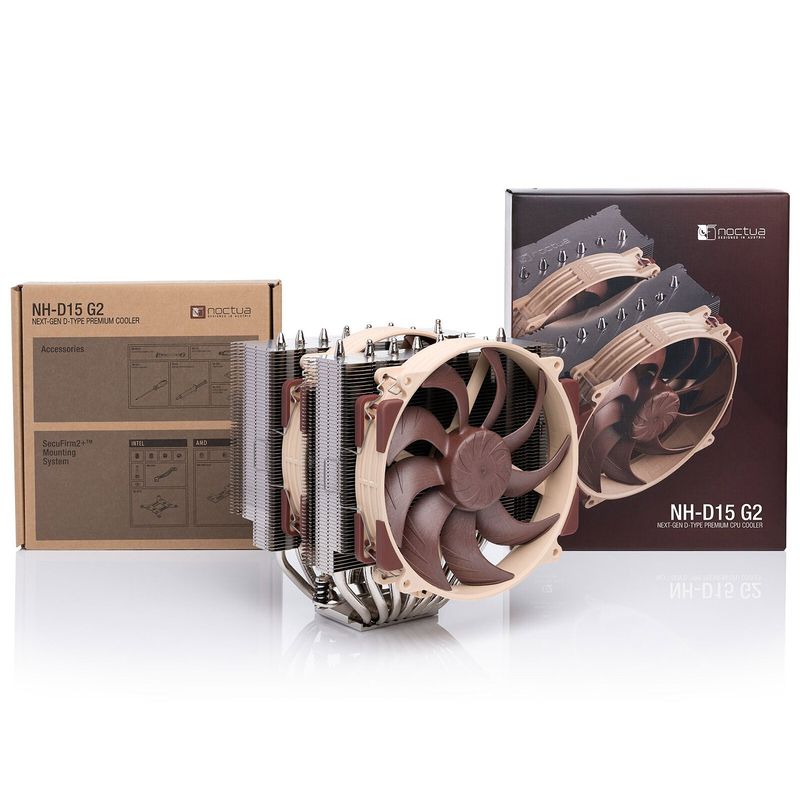
Noctua NH-D15
air, 165mm tall, rated for 280W TDP.
The reference air cooler. Cools 14900K and 9950X3D. Quiet legend. Brown aesthetic divides people. Worth every rupee.
Both official and parallel-import stock circulate. Official costs more but has full India warranty support. Confirm with seller which variant.
Full specs
CPUs this cooler can handle
Where to buy Noctua NH-D15 in India
Expect to pay roughly ₹12,900-14,200 for the Noctua NH-D15 in India right now, depending on offers and seller. I always recommend buying from retailers that give a proper GST invoice - it's what makes your India warranty claim smooth later.
Affiliate links on linked vendors - your price stays the same. PrimeABGB shown for comparison only.
In my years running a PC store, PrimeABGB (Mumbai) and Vedant Computers (Kolkata) have also been consistently reliable for verified stock - compare before buying.
Noctua NH-D15 in India - Is ₹10,000 for an Air Cooler Ever the Right Call?
Noctua NH-D15 in India - The Case for Spending ₹10,000 on an Air Cooler
Before anything else: this page is the shorter accessories-extended entry for the NH-D15 in the Indian market context. If you want the full technical deep-dive - mounting system, fan specifications, heatpipe geometry, benchmark data across platforms - go to the dedicated Noctua NH-D15 part page. This page answers a narrower question: does the NH-D15's ₹9,499–10,999 price tag make sense in an Indian build, and when should you choose it over an AIO?
That question has a specific answer in the Indian context, and it's different from what you'd get from a review written for a German or American audience.
30-Second Version: The Noctua NH-D15 costs ₹9,499–10,999 (chromax.black: ₹10,500–11,500) at MDComputers, PrimeABGB, Vedant Computers, and Amazon India. Dual-tower, 6 heatpipes, 2x 140mm NF-A15 fans. ~230W realistic TDP in Indian summer. 24.6 dBA under load - whisper-quiet. 6-year Noctua warranty. Fits AM4, AM5, LGA1700, LGA1851. At 165mm height, check case clearance. Beats 240mm AIOs thermally, matches 280mm AIOs - with zero pump failure risk. The Indian-specific case for it: AIO RMAs can take 3–6 weeks in India, and pump failures during Indian summer are not rare. For builds above ₹1.5L with a Ryzen 9 or i9 chip, the NH-D15 is the most reliable cooling solution available regardless of price.
Why Indian Summer and Indian RMA Policy Change the NH-D15 Math
In controlled benchmarks at 21°C ambient, a 280mm AIO keeps pace with the NH-D15 on a Ryzen 9 9950X. Sometimes the AIO is cooler by a few degrees. The NH-D15 gives back a few degrees elsewhere. They're close.
Now run those same benchmarks at 38°C ambient during a May afternoon in Delhi or Hyderabad, in a room without dedicated AC, with the ambient temperature cycling up and down with power cuts. The picture changes. AIOs are liquid loops with pumps - and pump failure rates, while low in aggregate, are catastrophically bad timing if it happens in summer. I've had two customers over the past four years deal with AIO pump failures. One was a Corsair H100i. One was a DeepCool AIO. Both happened during summer. Both resulted in thermal shutdown before either customer realized the pump had stopped.
Getting an AIO replaced under warranty in India takes time. The brand's authorized service center is typically in one or two major cities. You ship the cooler, they inspect it, they ship a replacement. Three to six weeks is not unusual. During that stretch, your PC either runs on a stock cooler (if you still have it) or it doesn't run.
The NH-D15 has no pump. No liquid. No moving parts except two fans - and if a fan fails, you buy a ₹2,500 NF-A15 replacement and swap it in 10 minutes. The 6-year Noctua warranty covers everything, and Noctua's India presence through MDComputers and PrimeABGB means warranty service is actually functional. I've seen Noctua India warranty claims resolved in under two weeks.
That's the Indian-specific case for the NH-D15. Not the benchmarks. The reliability and serviceability argument in a country where cooling failure during peak summer is a real and consequential event.
Thermal Performance in Indian Conditions
The NH-D15 is rated for 250W+ TDP and I put the realistic Indian summer ceiling at 230W. On a Ryzen 9 9950X at 35°C ambient under sustained Cinebench R23 multi-core, expect 85–89°C - within safe range for that chip. Lighter workloads (gaming, video editing, mixed use) stay comfortably under 80°C even in summer.
The 2x 140mm NF-A15 fans provide the airflow advantage that 120mm-fan dual-towers like the PA120 SE can't match. Larger fans move more air at lower RPM - which is why the NH-D15 achieves 24.6 dBA under load despite cooling 230W+ chips. It's quieter than the Thermalright PA120 SE under equivalent loads, which is remarkable given the thermal headroom difference.
India Pricing, Availability, and Case Compatibility
Noctua has established the most mature India distribution network of any premium European cooler brand. MDComputers, PrimeABGB, and Vedant Computers all stock the NH-D15 consistently. Amazon India has it available with Prime delivery in most metros. Offline availability through these stores' physical locations in Mumbai, Delhi, Bengaluru, and Hyderabad is reliable.
Price range: ₹9,499–10,999 for the standard beige/brown version. The chromax.black edition - identical performance, all-black fans and heatsink - runs ₹10,500–11,500. Most of my customers on high-end builds go for the chromax.black. The standard color scheme is famously functional and famously unattractive.
Height is 165mm. Most mid-tower ATX cases list 160–167mm CPU cooler clearance. Measure your specific case before ordering - the NH-D15 is right at the edge of many popular Indian mid-tower cabinets. Cases with 170mm+ clearance (Fractal Design cases, Corsair 4000D Airflow, Lian Li Lancool 216) have no issues.
The front fan's proximity to RAM slots is the other clearance concern. The NF-A15's large 140mm frame sits low and can interfere with tall RAM heatspreaders in the front two DIMM slots. Noctua's solution: the included mounting system allows you to remove the front fan for installation, then clip it back on. With standard-height RAM or RAM with heatspreaders under 40mm, there's no issue. With Corsair Vengeance or G.Skill Trident Z5 RGB tall-profile sticks, measure or plan to run in the rear DIMM slots.
The 6-year warranty is Noctua's standard and it covers defects properly. Noctua's India warranty process via MDComputers and PrimeABGB has worked consistently from what I've seen - not a theoretical warranty that expires at customs.
Who Should Buy / Who Should Skip
Buy the Noctua NH-D15 if:
- You're building a system at ₹1.5L+ or ₹2L+ with a Ryzen 9 or i9-tier chip
- You've had an AIO failure before (or know someone who has) and want zero-pump-failure-risk cooling
- You're in a region with frequent summer power cuts and your system needs to survive thermal stress during unpredictable load spikes
- You want a cooler that will outlast two or three CPU generations - the NH-D15 with SecuFirm2+ mounting system is compatible with every mainstream socket since AM4
- Silence matters alongside thermals - 24.6 dBA under load is exceptional for 230W TDP handling
Skip the NH-D15 if:
- Your build budget is under ₹1L - the ₹6,000+ premium over a DeepCool AK620 or PA120 SE isn't justified when your CPU is a Ryzen 5 or mid-range i5
- You're cooling a Ryzen 5 7600 or Ryzen 5 9600X - this is categorically overkill, and the Thermalright PA120 SE or AK620 gives you identical real-world temperatures for a fraction of the price
- Your case has less than 165mm CPU cooler clearance - don't force it
- You have tall-heatspreader RGB RAM and can't work around the front-fan clearance
For the complete technical specification breakdown, fan curves, mounting system detail, and cross-platform benchmark data, see the Noctua NH-D15 full part page.
Price we have actually seen
Up 3.8% since we started tracking. Every point is a price our crawler recorded at an Indian retailer - no estimates, no MSRP. Tracking began recently, so the window grows week by week.