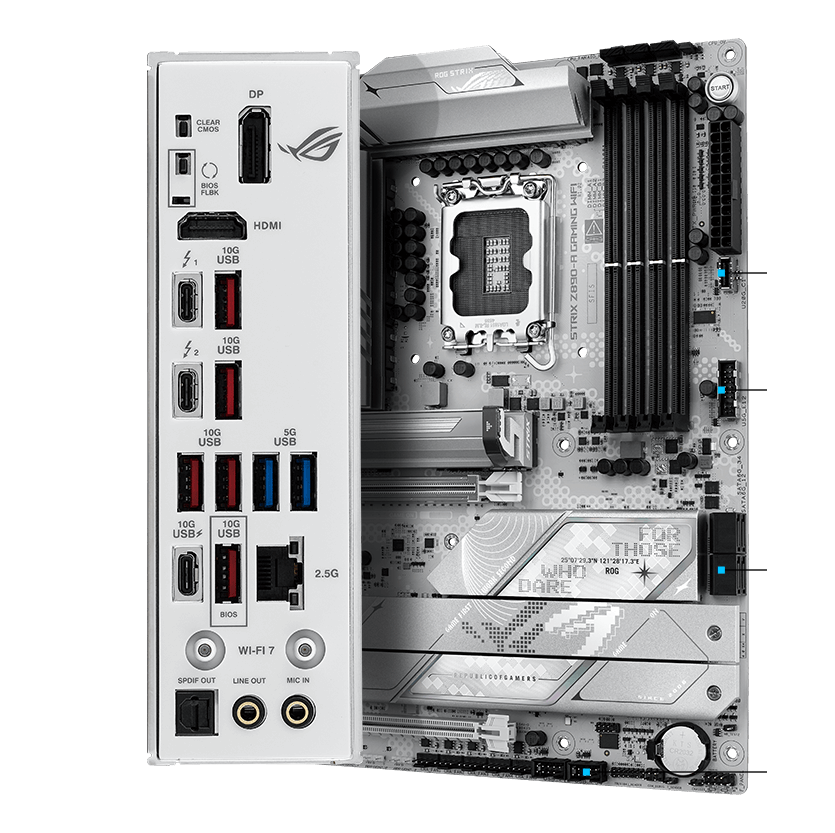
ASUS ROG Strix Z890-A Gaming WiFi
ATX Z890 board for LGA1851 CPUs, DDR5 memory, BIOS Flashback included.
Premium Arrow Lake board. White theme. 5 M.2 slots. WiFi 7. For enthusiast Core Ultra builds.
Official India stock. Full warranty through the brand's India service network, standard RMA if anything goes wrong.
Full specs
Compatible CPUs
DDR5 memory kits
Where to buy ASUS ROG Strix Z890-A Gaming WiFi in India
Expect to pay roughly ₹36,500-40,300 for the ASUS ROG Strix Z890-A Gaming WiFi in India right now, depending on offers and seller. I always recommend buying from retailers that give a proper GST invoice - it's what makes your India warranty claim smooth later.
Affiliate links on linked vendors - your price stays the same. PrimeABGB shown for comparison only.
In my years running a PC store, PrimeABGB (Mumbai) and Vedant Computers (Kolkata) have also been consistently reliable for verified stock - compare before buying.
ASUS ROG Strix Z890-A Gaming WiFi Review - Best Z890 LGA1851 Motherboard India 2025
ASUS ROG Strix Z890-A Gaming WiFi - Premium Intel Z890 for Serious Arrow Lake Builds
Arrow Lake (Intel Core Ultra 200 series) changed Intel's desktop platform, and Z890 is the chipset that unlocks its full potential. The ROG Strix Z890-A is ASUS's mid-premium offering in the Z890 lineup - not their absolute top-tier (that is the Maximus Z890 Apex), but significantly above the entry B860 boards.
What Z890 Gives You That B860 Does Not
The practical difference between Z890 and B860 on LGA1851 comes down to three things: CPU overclocking, PCIe 5.0 lane distribution, and VRM quality in the boards that actually ship with these chipsets.
On Z890, you can increase the CPU multiplier on unlocked K-series chips like the Core Ultra 9 285K and Core Ultra 7 265K. On B860, the multiplier is locked - you get only memory overclocking (XMP/EXPO). If you are buying a K-chip and not using a Z board, you have paid for potential you cannot access.
The ROG Strix Z890-A's 20+1 VRM is spec'd for sustained high-frequency operation with the Core Ultra 9 285K - Intel's top Arrow Lake chip which draws significant power under all-core loads. The additional CPU phase count compared to cheaper Z890 boards means lower per-phase temperatures and more stable voltage delivery during long rendering sessions.
India Pricing
MDComputers and PrimeABGB list this board in the ₹32,000–37,000 range. Amazon India typically runs ₹35,000–40,000. Vedant Computers in Kolkata is worth checking for stock. The board is distributed through Asus India (Rashi Peripherals) with a 3-year warranty.
Who Should Buy This
You are buying the Z890-A if you have a Core Ultra 9 285K or Core Ultra 7 265K and plan to run it at its rated boost clocks or higher. The 20+1 VRM, Thunderbolt 4, and four M.2 slots make it a complete flagship Intel platform without stepping up to the extreme-tier ROG Maximus.
If you are building a content creation workstation on Intel - video editing, 3D rendering, music production - the four M.2 slots and Thunderbolt 4 for external storage are practical advantages.
Who should not buy this: If your CPU is a Core Ultra 5 245K or a non-K variant like the Core Ultra 7 265, a B860 board at ₹16,000–22,000 handles those chips perfectly. Non-K chips cannot use Z890's CPU overclocking. You would be spending an extra ₹15,000+ for features your chip cannot leverage.
Price we have actually seen
Down 2.7% since we started tracking. Every point is a price our crawler recorded at an Indian retailer - no estimates, no MSRP. Tracking began recently, so the window grows week by week.
Questions
Yes. Z890 is fully unlocked for Intel's overclocking tools. ASUS's AI Overclocking in BIOS also provides automated tuning based on your specific chip's silicon lottery results.
For most users with WiFi 6 routers, no practical difference. WiFi 7's advantages in multi-link operation and 6GHz band optimisation become relevant as router hardware catches up. The Z890-A is ready when your network is.
Yes, with XMP/DOCP profiles and manual tuning. The Z890 memory controller handles high-speed DDR5 better than previous-gen Intel platforms. G.Skill and Corsair kits certified for Z890 are available in India at MDComputers.