A seller remembers spending ₹70,000 on a graphics card. A buyer sees a newer alternative available for much less. Both numbers can be correct, but only one describes the buyer’s options today. A sensible second-hand PC price starts with the hardware being offered, what it would cost to replace now, and the evidence that it works as described.
The calculator above puts those inputs into a consistent worksheet. It is useful when you want to sell an old desktop, compare a used GPU in India or break down a second-hand gaming PC listing. It does not know the final price of private transactions. Treat its range as a starting point for a conversation, then compare real alternatives and inspect the actual hardware.
How to estimate the price of used PC parts
Start by selecting the exact product. A GPU family name alone can hide different memory capacities, cooler designs and board variants. For RAM, identify whether the price covers one stick or a complete kit. For storage, match the capacity and model. If you cannot find your product in the catalogue, this tool cannot identify or value it from a typed name alone.
Next, check the current new price. When GetPC has a supported recent in-stock retail offer, the calculator uses it and names the source. When that live price is unavailable, enter today’s new price manually. Use the same model where possible. For a discontinued part, an equivalent replacement needs similar useful performance, capacity and features; an old out-of-stock listing at an inflated price is a poor starting point.
Add the age and working condition, then review the result and assumptions. The default calculation begins at 86% of the current new price and subtracts 0.8 percentage points per month, subject to a 18% floor. Condition adjusts that result. These are editable planning assumptions, not depreciation rates measured from Indian second-hand sales.
The midpoint and upper estimate are capped at 95% of the new-price input. A faulty part needs a separate assessment and blocks a normal working-PC estimate.
Should you use today’s price or your original purchase price?
Use today’s new price to anchor the estimate. Your original purchase price is useful for understanding your own gain or loss, but it should not raise the value merely because you bought during a shortage or paid for an expensive launch model. The next owner can compare your asking price with what is available now.
The opposite also matters: a bargain you bought cheaply does not automatically make the same hardware worth less today. That is why the optional “what you paid” field appears as a separate comparison. The formula does not average the invoice amount with the current price.
For a manual entry, confirm that the price is for a new, usable replacement with the stated capacity and necessary accessories. Keep the price source available for the buyer. The shareable estimate labels your entry as unverified rather than presenting it as a live retailer quote.
Worked example: a two-year-old graphics card
Suppose a new equivalent graphics card costs ₹25,000, your card is 24 months old and you select Good condition. Under the default settings, retained value is 86 − (24 × 0.8) = 66.8%. The midpoint is therefore ₹16,700, and the ±10% setting produces a planning range of ₹15,030–₹18,370.
If you originally paid ₹35,000, the difference from that midpoint is ₹18,300. This explains your estimated loss; it does not prove that a buyer will pay the midpoint. Repairs, missing accessories, weak demand or a better new option can change the negotiation.
How to judge a used GPU price in India
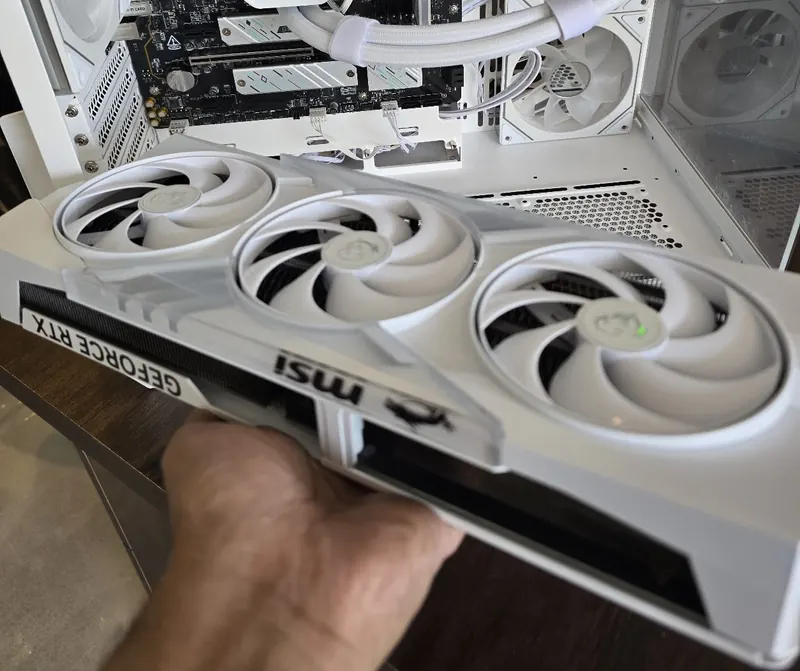
For a second-hand GPU, compare the exact card with a new alternative that meets your needs. A long cooler, premium RGB design or factory overclock may have cost the first owner more, but those features are only worth extra to a buyer who wants them. Check that the card also fits your case and that your power supply has the required connectors.
Ask for photographs of the actual card and evidence of it running. A useful demonstration identifies the model, shows the workload and records temperatures, clocks and any visible errors. A single screenshot is weaker evidence than a repeatable test you can observe. Do not accept “working” as a substitute for discussing crashes, display artefacts, noisy fans, repairs or intermittent faults.
A claimed mining history deserves questions about the card’s use and condition; a claim that it was never used for mining does not establish its health either. Avoid adding an automatic “gaming-only” premium or applying a universal mining discount. Price the documented condition and the risk you can actually assess.
How much is a complete second-hand gaming PC worth?
Break the system into components before judging the bundle. A three-year-old desktop may contain a recently replaced GPU and an older power supply. Enter those ages separately in Complete PC mode. Include the CPU, motherboard, memory kit, storage, graphics card, PSU, case and cooler as appropriate; quantity should reflect the units included, not the number of sticks already sold as one RAM kit.
The sum of the component estimates is a comparison total, not a guaranteed bundle selling price. Selling the whole system can save you the effort of multiple transactions, while the buyer may want a discount for taking parts they would not otherwise choose. A monitor, keyboard and mouse should be identified separately so an attractive headline price does not disguise what is included.
For a used mini PC or branded office desktop, confirm the exact configuration and any proprietary parts before using component comparisons. Small-form-factor cases, custom motherboards and included power adapters can make a generic custom-PC comparison misleading. Do not invent a priced component merely to make the total look complete.
Condition and warranty: what supports the asking price?
| Hardware | Useful evidence | Reason to reassess |
|---|---|---|
| GPU | Exact model, load-test behaviour, fan operation | Artefacts, crashes, undisclosed repairs |
| CPU / motherboard / RAM | Correct identity, stable configuration, working ports and slots | Memory errors, bent contacts, intermittent faults |
| SSD / hard drive | Exact capacity, manufacturer-supported health information, working test | Reported warnings, inconsistent operation, unclear identity |
| PSU / cooler / case | Exact model, required cables or mounting hardware, physical inspection | Missing modular cables, leakage, damaged fittings |
Storage deserves particular care. For supported Kingston SSDs, Kingston SSD Manager provides health, status and usage information. Use the relevant manufacturer’s tools where available. A health display is evidence to discuss, not a guarantee of the drive’s remaining life.
Ask for the invoice, purchase date, exact-unit eligibility and the manufacturer’s terms before paying more for “warranty remaining.” Do not assume a reported duration establishes transferability. The calculator records warranty and invoice information as context and does not attach a universal price premium.
For a deeper inspection process, use our guide to buying used PC parts in India. For a claim that is already needed, see the RMA and warranty-claim guide. An asking-price calculation cannot replace either process.
How to prepare a second-hand PC listing
Write the listing so someone can compare it without messaging you for every detail. Include the exact component names, age, working condition, repairs, invoice availability, missing accessories and what is included in the price. State whether a monitor or peripherals are separate. Photograph the actual hardware and hide serial numbers and personal information in public images.
- Identify. Match the hardware labels and configuration to your description.
- Demonstrate. Save dated working-condition evidence and disclose known faults.
- Explain the price. Share the estimate together with its current-price source and assumptions.
- Agree the handover. Put the included items, agreed amount and any agreed checking period in writing.
Before handing over a whole Windows PC, back up what you need and remove your personal data. Microsoft’s reset guidance explains the Remove everything and Clean data options for selling or giving away a PC. Follow the appropriate process for every drive included; do not assume deleting a few files prepares a machine for its next owner.
You can copy the calculator breakdown as text or Markdown, or download a GetPC-branded image for a price-check discussion. Reddit opens a draft for review, with the image attached separately if you choose. Share the assumptions as well as the headline range so other people can explain where they disagree.
Second-hand PC price questions
Is this a verified second-hand market valuation?
No. It applies a visible formula to a live or manually entered new-price reference. There is no completed-sales dataset behind the range, so it is not a guaranteed asking price, buyback offer or sale quotation.
Why might my part sell outside the estimate?
Local demand, a competing new model, condition, accessories, the quality of the evidence and negotiation can all change an actual deal. The displayed range is controlled by the formula settings; it is not a statistical confidence interval.
What if the current price is unavailable?
Select the exact catalogue product, then manually enter today’s new price. For a discontinued model, use an equivalent replacement only after comparing its useful performance and features. If you cannot identify a defensible price, leave it unpriced rather than inventing one.
Can I value faulty or repaired PC parts?
The standard estimate is for working hardware. Selecting Faulty blocks the estimate and requires a separate diagnosis or salvage assessment. A repaired part also needs its repair history and current operation discussed; the tool has no automatic repair-risk model.
Will a higher original purchase price increase my result?
No. Original purchase cost is shown only as a comparison with the midpoint. The current new-price input, age, working condition, quantity and displayed assumptions determine the arithmetic.