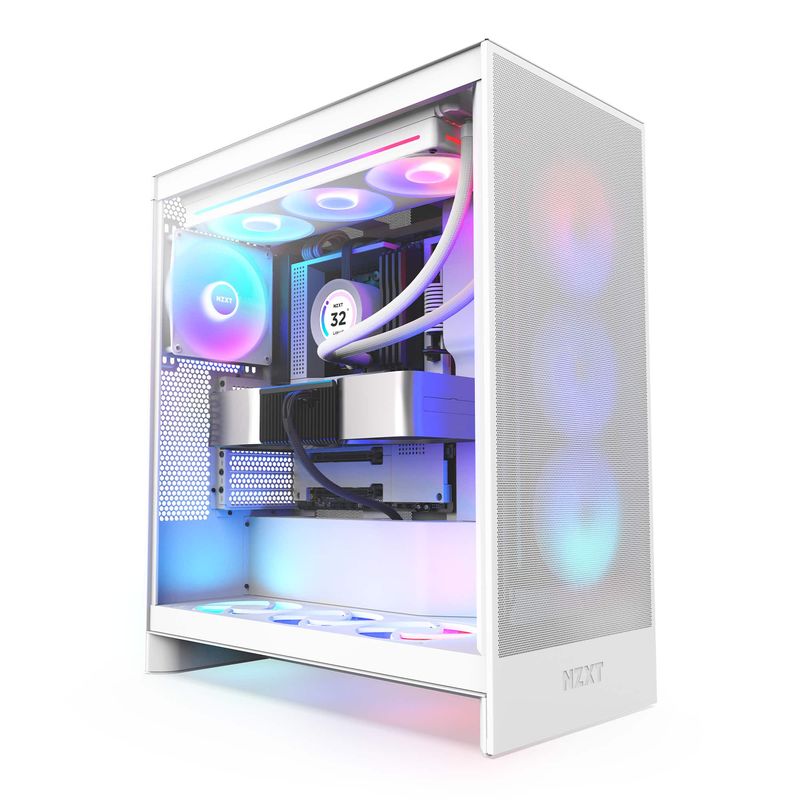
NZXT H7 Flow (2024)
Mid-tower case supporting up to 400mm GPUs and 185mm coolers. 2 fans included.
Bigger sibling to H5. More fan mounts, more clearance. Clean aesthetic. Premium pricing for the brand cachet.
Official India stock. Full warranty through the brand's India service network, standard RMA if anything goes wrong.
Full specs
GPUs that fit (≤400mm)
Air coolers that fit
Where to buy NZXT H7 Flow (2024) in India
Expect to pay roughly ₹11,500-12,700 for the NZXT H7 Flow (2024) in India right now, depending on offers and seller. I always recommend buying from retailers that give a proper GST invoice - it's what makes your India warranty claim smooth later.
Affiliate links on linked vendors - your price stays the same. PrimeABGB shown for comparison only.
In my years running a PC store, PrimeABGB (Mumbai) and Vedant Computers (Kolkata) have also been consistently reliable for verified stock - compare before buying.
Corsair iCUE 4000X RGB Review India 2025 - Mid-Tower for Builders Who Want the Look
Corsair iCUE 4000X RGB - When Looks Come First and Thermals Come Second
Not every build is about extracting maximum thermals. Some builds live in the living room next to the TV. Some are on display desks where the side panel is always visible. Some people just want RGB and three glass panels, and there's nothing wrong with that - as long as you go in knowing what you're trading away.
The Corsair iCUE 4000X RGB is a good case. It's just not an airflow case. Here's the full picture for India.
Price: ₹9,500–13,000 at Indian retailers. MDComputers and PrimeABGB are the most consistent sources.
What You Get in the Box
Three tempered glass panels - front, left side, and right side. Three Corsair LL120 RGB fans pre-installed at the front as intake. iCUE lighting controller included, so the fans connect directly to Corsair's software ecosystem if you're on a Corsair-compatible motherboard.
The build quality is genuinely good. Corsair doesn't cut corners on the steel thickness or panel fitment at this price. The tempered glass panels clip and hinge cleanly - no wobbly panels, no flexing when you touch the side.
Cable management is reasonable: PSU shroud covers the bottom, routing channels behind the motherboard tray, and a couple of velcro straps included. I've built in the 4000D before and the 4000X shares the same interior layout, so cable management is straightforward for a mid-tower.
The Airflow Trade-Off
This is the conversation worth having before you buy. The front panel on the 4000X is tempered glass. That means the three intake fans behind it are pulling air through a solid glass surface - there's a small gap at the edges, but it's not a mesh intake.
How much does it matter? In a temperate Indian room (22–25°C), not dramatically - maybe 2–4°C warmer CPU and GPU under gaming load compared to a mesh-front case. In a hot room (30°C+, which is common in non-AC rooms in summer across India), that difference compounds with ambient temperature. If your PC is in a closed entertainment unit or against a wall, restricted airflow makes it worse.
The 4000D Airflow (mesh front, no RGB fans included) runs noticeably cooler. If you've already decided on the 4000X for visual reasons, that's a valid call. Just don't add more glass inside - keep the mesh side panel on if there's one in your variant, and make sure front fan positioning is intake, not exhaust.
Corsair iCUE Ecosystem
Three LL120 fans controlled through Corsair iCUE software. If you're also running Corsair RAM (Vengeance or Dominator), a Corsair AIO, and a Corsair keyboard, the whole system syncs together inside iCUE. It's a legitimately good experience when everything is Corsair. If you're mixing brands - ASUS Aura GPU, non-Corsair AIO - you'll need to run two separate lighting apps. Not a dealbreaker, just worth knowing.
India-Specific Notes
The 4000X is popular for living room gaming setups in India, where the PC is visible next to the TV and the RGB is part of the room aesthetic. It's also common in YouTube build showcases because it photographs well. Both are legitimate reasons to buy a case.
Availability is consistent: MDComputers, PrimeABGB, and Vedant all stock it. Amazon India carries it but pricing tends to be ₹500–1,000 higher. Corsair products in India are distributed through Acro Engineering - warranty support is handled through them, generally responsive.
Who Should Buy This
Living room PC builds. Display setups on open desks. People who genuinely want the RGB showcase and are willing to accept slightly warmer thermals. Corsair ecosystem builders who want iCUE sync across all components.
Who Should Skip
Any builder running an overclocked CPU or high-TDP GPU in a warm room. Anyone who prioritizes thermals over visuals - get the 4000D Airflow instead, it's often ₹12,000–2,000 cheaper and cools better. Builders in non-AC rooms during Indian summers: mesh is a serious consideration.
Questions
Yes, but with context. Thermals are acceptable, not excellent. For i5-13400F + RTX 4060 builds in an AC room, it's fine. For i7 + RTX 4080 in a hot room, consider the 4000D Airflow instead.
Yes - three Corsair LL120 RGB fans pre-installed as front intakes. You'll likely want to add one more at the rear as exhaust, which is not included.
4000D Airflow if thermals matter. 4000X if aesthetics matter. Simple as that.
360mm. Fits essentially any current GPU including RTX 4090 FE and most aftermarket triple-fan cards.