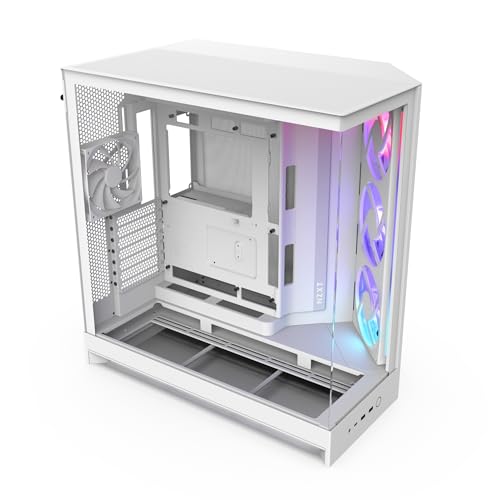
NZXT H9 Flow
Mid-tower case supporting up to 435mm GPUs and 165mm coolers. Included fan count not specified.
Catalogue classification: official India distribution. This does not verify a retailer's current stock. Confirm the exact model, invoice and applicable India warranty with the seller or brand.
Full specs
GPUs that fit (≤435mm)
Air coolers that fit
Where to buy NZXT H9 Flow in India
Indicative catalogue range: ₹13,400-14,800 for the NZXT H9 Flow. This is not a verified current retailer price. Confirm price and availability with the seller and buy with a proper GST invoice for warranty claims.
Affiliate links on linked vendors - your price stays the same. PrimeABGB shown for comparison only.
Compare the exact model, current availability, invoice and written warranty terms before paying. A retailer link or catalogue label does not verify the stock you will receive.
NZXT H9 Flow Review: Dual-Chamber Airflow Case for Indian Builds (Price & Thermals)
NZXT H9 Flow: The Dual-Chamber Case That Chose Airflow Over Showroom Glass
I get asked constantly why I keep steering people away from the glossy, glass-everywhere cases toward mesh-front alternatives. The NZXT H9 Flow is the cleanest answer I have. It's the airflow-first sibling in NZXT's dual-chamber H9 line, and in a country where your cabinet spends half the year fighting 35-40°C ambient temperatures, that mesh front and mesh top aren't a downgrade from the H9 Elite's glass, they're the whole point.
₹13,994-17,910 depending on whether you get the fan-included or barebones SKU. Dual-chamber layout hides your PSU and cables in a second compartment, genuinely useful if you're a first-time builder. Mesh front and top mean it runs noticeably cooler than the glass-heavy H9 Elite, which matters in Indian summers. Up to 435mm GPU clearance and 360mm radiator support front and top, so it handles RTX 4070 Ti/4080-class cards and a 360mm AIO without drama. If you want the showcase glass look instead, see the H9 Elite. If you want the same airflow philosophy for less money, look at the Lancool 207.
Why the Dual-Chamber Layout Actually Matters Here
The H9 Flow splits into two compartments. Your motherboard, GPU, and CPU cooler sit in the main chamber, visible through the glass side panel. Your PSU and the worst of your cable spaghetti get pushed into a second, hidden chamber behind it. I've built in enough first-timer PCs to know that cable management is where most beginners lose confidence and patience. Having a chamber that literally swallows the ugly wiring makes the build look clean without needing perfect routing skills, and that's worth more to a first-time builder than any RGB strip.
Where the H9 Flow earns its name over the H9 Elite is the panels. Elite leans into tempered glass on the front too, which looks great on a desk but chokes intake airflow. Flow swaps that front glass (and the top) for mesh. In my experience testing similarly-configured cases through an Indian summer, that difference isn't marginal, it typically shows up as several degrees lower sustained load temps on both GPU and CPU once your room is sitting at 30°C+ ambient with the AC off or struggling.
Clearance That Doesn't Make You Compromise on GPU or Cooler
At roughly 435mm of GPU clearance, the H9 Flow fits essentially anything you'd realistically pair with a mid-to-high-end Indian build right now: RTX 4070 Ti, 4080, or the newer 5070 Ti/5080-class cards in their triple-slot forms. I haven't seen a card in current Indian retail that struggles here. Radiator support goes up to 360mm on both the front and the top, so if you're running a 7800X3D, 9800X3D, or a 14700K and want a 360mm AIO instead of relying on a big air cooler, the H9 Flow has the room without forcing you to remove drive cages or fight the PSU shroud.
The dust filtration is the other piece that matters more here than most spec sheets let on. The magnetic mesh intake filters pop off for cleaning, which sounds minor until you've opened a six-month-old cabinet in Delhi or Mumbai during monsoon season and seen what collects on an unfiltered intake. Washable filters on a mesh-heavy case are the right combination for Indian conditions, not a nice-to-have.
India Pricing and Availability
The H9 Flow sits in a ₹13,994-17,910 range across PCStudio.in, ComputechStore, and Vedant Computers, and that spread isn't random, it reflects the barebones SKU (no fans included, cheaper) versus the fan-equipped trims closer to ₹17,910. If you already have spare case fans from a previous build or plan to buy specific ones for your radiator, the barebones version saves you real money. If you're buying fresh, the fan-included SKU is usually the better value since NZXT's stock fans are perfectly competent. Stock has been reasonably consistent at these retailers, though tier-2/3 city buyers should expect to order online rather than find it sitting on a local shop shelf, since NZXT distribution in India still leans toward the bigger online-first retailers over regional stores.
Who Should Buy the H9 Flow
Buy this if you're building a mid-to-high-end rig (RTX 4070-class or above) and want a 360mm AIO or a big air cooler without a clearance headache. Buy it if you're a first-time builder who wants the dual-chamber cable-hiding trick without paying flagship prices. Buy it if you've been eyeing the H9 Elite but actually care more about your GPU temps than showroom glass.
Who Should Skip It
Skip it if your desk space is tight, this is a full-size case and the H9 Flow's footprint won't suit a small-room setup, look at the H6 Flow RGB instead. Skip it if you're on a budget build with a mid-range GPU, the Lancool 207 gets you similar airflow philosophy for meaningfully less money. And skip it if RGB and showcase aesthetics matter more to you than thermals, the H9 Elite's glass front will look better on camera even though it runs a few degrees warmer.
Price we have actually seen
Hover or tap the chart for a recorded price. Use ← → when focused.
View all recorded prices
| Date | Price |
|---|---|
| ₹21,389 | |
| ₹21,389 | |
| ₹21,389 | |
| ₹21,389 | |
| ₹13,994 | |
| ₹13,994 | |
| ₹13,994 | |
| ₹13,994 | |
| ₹13,994 | |
| ₹13,994 | |
| ₹13,994 | |
| ₹20,319 | |
| ₹20,319 | |
| ₹20,319 | |
| ₹20,319 | |
| ₹13,994 | |
| ₹13,994 | |
| ₹13,994 | |
| ₹13,994 | |
| ₹13,994 | |
| ₹13,994 | |
| ₹13,994 | |
| ₹20,319 | |
| ₹20,319 | |
| ₹20,319 | |
| ₹20,319 | |
| ₹20,319 | |
| ₹13,994 | |
| ₹13,994 | |
| ₹13,994 |
Down 34.6% since we started tracking. Every point is a price our crawler recorded at an Indian retailer - no estimates, no MSRP. Tracking began recently, so the window grows week by week.
Questions
Yes, both barebones and fan-included versions are sold in India, which explains the ₹13,994-17,910 price spread you'll see across retailers. Check the specific listing carefully before ordering.
Yes, it supports up to 360mm radiators in both the front and top mounts, so a 360mm AIO paired with a high-TDP CPU like the 7800X3D or 9800X3D fits comfortably.
The H9 Flow runs cooler thanks to its mesh front and top panels versus the Elite's glass-heavy design. If your room regularly hits 30°C+ ambient without strong AC, that airflow advantage becomes more noticeable under sustained gaming or rendering loads.
Not overkill exactly, but you're paying for clearance and airflow headroom you may not need yet. If your budget is tight and you're running a 4060-class card, the Lancool 207 delivers similar mesh-first airflow for less money, saving that difference for a better PSU or SSD.
Related parts and guides: check out the NZXT H9 Elite if showcase glass matters more to you, the compact NZXT H6 Flow RGB for smaller desks, and our guide on cooling for Indian climate for more on why mesh-first cases matter here. If this is your first build, our first build mistakes guide covers cable management traps this case helps you avoid.