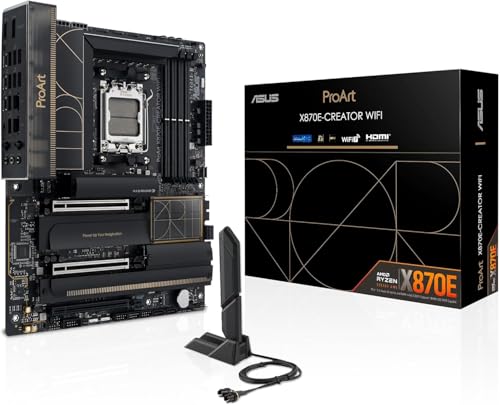
ASUS ProArt X870E Creator WiFi
ATX X870E board for AM5 CPUs, DDR5 memory, BIOS Flashback included.
The ASUS ProArt X870E-Creator WiFi is priced at ₹50,999 in India, and it's a genuinely different animal from every other board in this X870E batch — it's built for video editors, 3D artists, and streamers, not gamers chasing RGB and extreme.
Official India stock. Full warranty through the brand's India service network, standard RMA if anything goes wrong.
Full specs
Compatible CPUs
DDR5 memory kits
Where to buy ASUS ProArt X870E Creator WiFi in India
Expect to pay roughly ₹49,000-54,100 for the ASUS ProArt X870E Creator WiFi in India right now, depending on offers and seller. I always recommend buying from retailers that give a proper GST invoice - it's what makes your India warranty claim smooth later.
Affiliate links on linked vendors - your price stays the same. PrimeABGB shown for comparison only.
In my years running a PC store, PrimeABGB (Mumbai) and Vedant Computers (Kolkata) have also been consistently reliable for verified stock - compare before buying.
ASUS ProArt X870E-Creator WiFi Review India 2026 — The AM5 Board for Creators, Not Gamers
Why a Creator-Focused Board Actually Matters Here
Every other board in this X870E batch is built around a gaming identity — RGB, aggressive heatsink styling, marketing built around frame rates and overclocking headroom. The ProArt line exists specifically because that's the wrong set of priorities for a video editor, 3D renderer, or streamer, and ASUS has built a genuinely distinct product rather than just repainting a gaming board in grey and calling it a workstation SKU.
The headline feature is networking: ProArt Creator boards typically pair 2.5GbE with a 10GbE port, which matters enormously if you're pulling large project files or raw footage off a NAS — a 10G connection cuts real transfer time from minutes to seconds on multi-gigabyte files, in a way gaming-focused 5GbE or 1GbE boards simply can't match. Thunderbolt 4 (or USB4 at 40Gbps) connectivity is standard, which is the actual workflow feature for creators — fast external SSDs, single-cable eGPU or dock setups, and high-bandwidth capture devices all lean on it.
Beyond networking, you get the same X870E baseline as everything else in this batch — mandatory PCIe 5.0 on GPU and primary M.2, an 18+2-class VRM capable of handling a Ryzen 9 9950X or 9900X3D under sustained multi-hour render loads (a very different stress profile from gaming bursts), and WiFi 7. The aesthetic is deliberately restrained: grey and white color scheme, minimal RGB, designed to look at home in a studio setup rather than a gaming rig.
India Pricing
Confirmed at ₹50,999, consistently at both computechstore.in and primeabgb.com — the tightest, most consistent pricing of any board in this batch, which suggests this is a well-established SKU in the Indian channel rather than a fresh launch still settling into its street price.
If your primary use case is gaming, this board's price premium over the ASUS ROG Strix X870E-E Gaming WiFi buys you creator-specific networking and I/O you won't use. Buy the Strix instead. This board earns its keep specifically on 10GbE transfers and Thunderbolt 4 workflows.
Who Should Buy the ProArt X870E-Creator WiFi
Buy this if you edit video, work with large 3D or CAD project files, stream at a professional level, or otherwise move large files across a network regularly and would benefit from 10GbE. Buy this if you want Thunderbolt 4 for fast external storage or capture devices without stepping up to Crosshair Hero pricing.
Skip this if gaming is your primary use case — the 10G LAN and Thunderbolt 4 are wasted money if you're not using them, and the ASUS ROG Strix X870E-E Gaming WiFi or Gigabyte X870E Aorus Master deliver better gaming-relevant value at similar or lower prices.
Price we have actually seen
Up 14.5% since we started tracking. Every point is a price our crawler recorded at an Indian retailer - no estimates, no MSRP. Tracking began recently, so the window grows week by week.
Questions
Yes, functionally — the VRM and PCIe 5.0 support are equivalent to gaming-branded X870E boards. You're just paying for creator-specific I/O (10GbE, Thunderbolt 4) that a gaming-only build won't use, so it's not the most efficient gaming purchase even though it performs fine as one.
Only if you have a NAS, a wired network switch capable of 10G, or regularly transfer huge files locally. Without 10G-capable infrastructure elsewhere on your network, the port won't be bottlenecked but also won't show its full benefit — you'd still see gains over 2.5GbE for local transfers to a similarly-equipped machine.
Ryzen 9 9950X is the natural fit for render-heavy, multi-core creator workloads — it has more raw multi-thread throughput than the 9950X3D for non-gaming tasks like video encoding and 3D rendering. If your work also involves gaming or real-time preview scrubbing that benefits from cache, the Ryzen 9 9950X3D is worth considering instead.