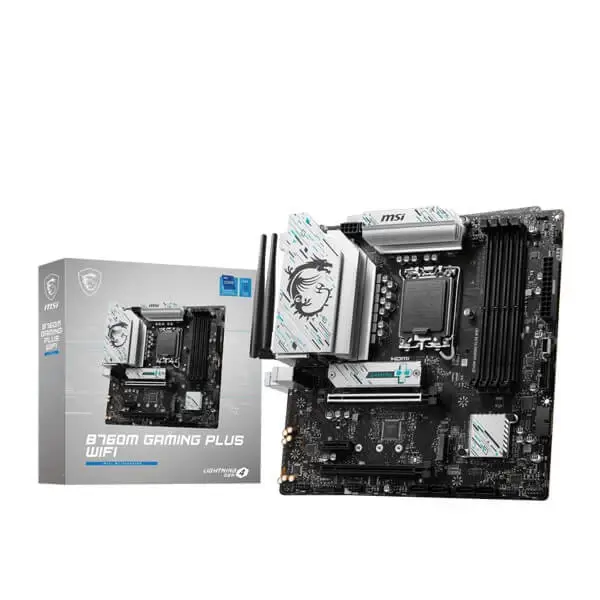
MSI B760M Gaming Plus WiFi DDR5
mATX B760 board for LGA1700 CPUs, DDR5 memory, no BIOS Flashback - watch for BIOS update needs.
Four-DIMM DDR5 B760M with a 12+1-phase CPU power design, WiFi 6E, front USB-C and two Gen4 M.2 slots. A balanced i5/i7 board, while high-power unlocked i7/i9 pairings still deserve the engine's B760 caution.
Official India stock. Full warranty through the brand's India service network, standard RMA if anything goes wrong.
Full specs
DDR5 memory kits
Where to buy MSI B760M Gaming Plus WiFi DDR5 in India
Indicative catalogue range: ₹15,500-17,100 for the MSI B760M Gaming Plus WiFi DDR5. This is not a verified current retailer price. Confirm price and availability with the seller and buy with a proper GST invoice for warranty claims.
Affiliate links on linked vendors - your price stays the same. PrimeABGB shown for comparison only.
In my years running a PC store, PrimeABGB (Mumbai) and Vedant Computers (Kolkata) have also been consistently reliable for verified stock - compare before buying.
MSI B760M Gaming Plus WiFi DDR5 Review: Expansion Features for a Small Intel Build
Four memory sockets give capacity options. They do not guarantee the same XMP settings with four sticks.
An Intel DDR5 build needing memory capacity options and case USB-C.
Four DIMMs, a 5Gbps front Type-C header and WiFi 6E.
Two onboard SSDs; SATA M.2 in M2_2 disables SATA8.
Specification-based buying assessment, not a hands-on performance test.
What the DDR5 Plus is for
The B760M Gaming Plus WiFi DDR5 belongs on a shortlist for a compact Intel desktop that needs four memory sockets and a usable case Type-C port. Its practical appeal is combining those features with onboard wireless, not delivering a guaranteed improvement in frame rate over another compatible B760 board.
It is worth comparing against the two-DIMM Bomber and Gaming WiFi models when the planned machine has a longer memory-upgrade path. If none of the extra connectors will be used, the simpler board may leave more budget for the parts that directly affect your workload.
Correct model and connectors
MSI's B760M Gaming Plus WiFi specification covers the DDR5 model. It lists four DDR5 sockets, two Gen4 x4 storage M.2 slots, four SATA ports, WiFi 6E, Bluetooth 5.3 and 2.5GbE. The front Type-C header is 5Gbps. M2_2 supports SATA mode, which disables SATA8.
The name has no DDR5 suffix on MSI's product page; GetPC uses one to distinguish it from the separate DDR4 version. Check the full invoice description rather than using a stock photograph as proof of the memory type. LGA1700 Core 12th/13th/14th-generation support also requires checking the installed BIOS against the selected CPU.
| Feature | What to plan for |
|---|---|
| Platform | LGA1700 / B760 · micro-ATX |
| Memory | Four DDR5 sockets · start with a matched kit |
| Storage | M2_1 CPU + M2_2 chipset · up to Gen4 x4 |
| SATA condition | Four SATA ports · SATA8 unavailable with SATA M.2 in M2_2 |
| Front USB-C | 5Gbps internal header |
| Network | WiFi 6E + Bluetooth 5.3 · 2.5GbE |
Interface ratings are not measured results. Exact-model specification →
Memory-capacity advice
Four sockets offer room for capacity growth, but maximum advertised memory capacity and maximum OC speed are different conditions. A large four-stick setup may need lower settings than a two-stick kit. For content creation or virtual machines, prioritise stable capacity; for a gaming PC, avoid spending on unused capacity solely to fill every socket.
Choose a matched DDR5 kit from the model's support list. Test with defaults before enabling XMP, and remember that B760 memory tuning is not unlocked CPU-multiplier overclocking. A K or KF processor can run here without making those CPU overclocking controls available.
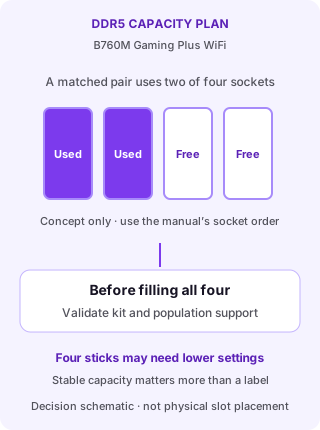
Capacity growth is a configuration decision
Start with a matched two-stick DDR5 kit installed in the manual’s recommended sockets. Two unused sockets leave options for capacity growth.
Before adding another pair, check the support list for the intended capacity and population. Two separately purchased kits are not automatically a validated four-stick set.
More populated sockets may need lower memory settings. Choose stable capacity for the workload rather than treating an advertised maximum OC speed as universal.
Check the build around the board
The USB-C header is useful if the case actually includes a compatible cable. Do not buy it expecting USB4 bandwidth from the Type-C shape. Likewise, two onboard SSDs cover many desktops, but a plan for three NVMe drives needs a different board or an expansion solution.
Micro-ATX fit does not prove that every add-in card remains accessible below a large GPU. Lay out the capture card, GPU and cables first. Check cooler and radiator clearance against the chassis specification separately.
MSI’s unsuffixed Gaming Plus is DDR5, distinct from the DDR4 model.
Plan stable project/VM capacity before ordering the kit.
Match the 5Gbps Type-C cable and check the SATA8 sharing condition.
Verdict and evidence limits
Choose the DDR5 Plus when its extra sockets and front header solve real needs in the build. Prefer the DDR4 version only when suitable existing RAM makes reuse worthwhile; compare total platform cost, not board cost alone. This assessment uses exact-model manufacturer documentation, not hands-on thermal testing. It makes no fresh retailer-price claim; verify CPU support, stock, included antennas and warranty before purchase.
Price we have actually seen
Hover or tap the chart for a recorded price. Use ← → when focused.
View all recorded prices
| Date | Price |
|---|---|
| ₹18,199 | |
| ₹18,199 | |
| ₹18,199 | |
| ₹18,199 | |
| ₹18,199 | |
| ₹18,199 | |
| ₹16,169 | |
| ₹16,169 | |
| ₹16,169 | |
| ₹16,829 | |
| ₹16,829 | |
| ₹16,829 | |
| ₹16,829 | |
| ₹16,829 | |
| ₹16,829 | |
| ₹16,829 | |
| ₹16,829 | |
| ₹16,829 | |
| ₹16,829 | |
| ₹16,829 | |
| ₹16,829 | |
| ₹16,829 | |
| ₹16,829 | |
| ₹16,829 | |
| ₹16,829 | |
| ₹16,279 | |
| ₹16,279 | |
| ₹16,279 | |
| ₹16,279 | |
| ₹16,279 |
Down 10.6% since we started tracking. Every point is a price our crawler recorded at an Indian retailer - no estimates, no MSRP. Tracking began recently, so the window grows week by week.