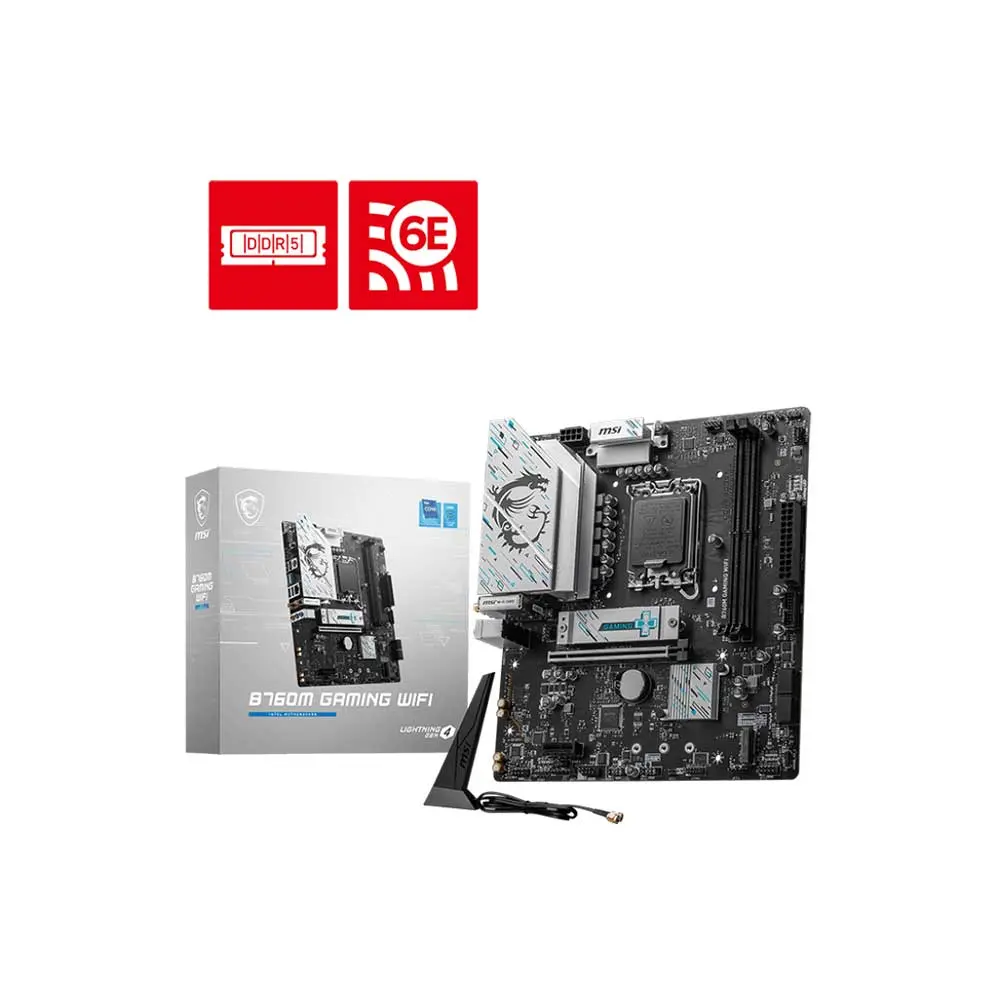
MSI B760M Gaming WiFi DDR5
mATX B760 board for LGA1700 CPUs, DDR5 memory, no BIOS Flashback - watch for BIOS update needs.
Compact two-DIMM DDR5 B760 with WiFi 6E, 2.5GbE and two Gen4 M.2 slots. A practical i5 gaming board, but still a basic VRM choice rather than an unrestricted high-power i7/i9 board.
Official India stock. Full warranty through the brand's India service network, standard RMA if anything goes wrong.
Full specs
DDR5 memory kits
Where to buy MSI B760M Gaming WiFi DDR5 in India
Indicative catalogue range: ₹11,100-12,300 for the MSI B760M Gaming WiFi DDR5. This is not a verified current retailer price. Confirm price and availability with the seller and buy with a proper GST invoice for warranty claims.
Affiliate links on linked vendors - your price stays the same. PrimeABGB shown for comparison only.
In my years running a PC store, PrimeABGB (Mumbai) and Vedant Computers (Kolkata) have also been consistently reliable for verified stock - compare before buying.
MSI B760M Gaming WiFi DDR5 Review: Know What the Non-Plus Model Omits
A simple wireless Intel desktop. Choose Plus when you actually need its extra connectors.
A two-DIMM, two-SSD DDR5 build using onboard wireless.
Two Gen4 M.2 slots, WiFi 6E and 2.5GbE.
No front Type-C header listed; Gaming Plus provides one.
Specification-based buying assessment, not a hands-on performance test.
Consider it for a simple wireless desktop
The B760M Gaming WiFi DDR5 can suit a compact LGA1700 build that needs onboard wireless but does not require the four memory sockets or front Type-C header of the Gaming Plus. That is the meaningful distinction to check before purchase. Similar names do not make the models interchangeable.
For a gaming PC with a single graphics card and a pair of SSDs, the connector limits may be entirely acceptable. For a machine expected to expand with large memory kits and add-in cards, inspect the layout and alternative models first.
Exact non-Plus specification
MSI India's B760M Gaming WiFi specification identifies a DDR5 board with two DIMM sockets, two Gen4 x4 storage M.2 connectors, four SATA ports, WiFi 6E, Bluetooth 5.3 and 2.5GbE. Using a SATA M.2 drive in M2_2 disables SATA7. The listed internal USB connections do not include a front Type-C header.
This is not the Gaming Plus and not Gigabyte's B760M Gaming WiFi. Intel Core 12th/13th/14th-generation processors use its LGA1700 socket, subject to the exact CPU's BIOS requirement. A newer Core Ultra processor is not a drop-in upgrade.
| Feature | What to plan for |
|---|---|
| Platform | LGA1700 / B760 · micro-ATX |
| Memory | Two DDR5 sockets · not Gaming Plus |
| Storage | Two Gen4 x4 M.2 connectors · four SATA |
| SATA condition | SATA M.2 in M2_2 disables SATA7 |
| Front USB-C | No matching internal Type-C header listed |
| Network | WiFi 6E + Bluetooth 5.3 · 2.5GbE |
Interface ratings are not measured results. Exact-model specification →
Decide the memory capacity before ordering
A matched two-stick kit is a straightforward starting point. The trade-off is that both sockets may already be occupied, so a capacity upgrade can require replacing the original kit. If you expect large video projects or many virtual machines, investigate that future memory cost before choosing the cheaper board today.
MSI's listed OC memory rates are conditional on CPU and memory configuration. They should not become a promise that an arbitrary high-speed kit will work at its advertised profile. Test stable defaults first, then enable XMP and verify again. B760 does not provide unlocked CPU-multiplier overclocking.

Check the case port before selecting non-Plus
A front Type-C socket on the case needs the matching motherboard connection. The non-Plus model’s listed internal USB connections omit that header.
If front USB-C is part of daily use, compare Gaming Plus, which lists a 5Gbps header. If the port is unnecessary, the simpler model may cover the build.
Both memory sockets can be occupied by the initial pair. An upgrade in capacity may require replacing that kit, rather than adding a second pair.
Old drives and unused case ports
For two NVMe SSDs, use the manual's storage diagram to assign the boot and secondary drive. If an older M.2 drive is SATA rather than NVMe, the sharing rule matters when other SATA drives are connected. Keep that distinction in mind when transferring storage from an existing system.
A case front Type-C socket can remain unusable when the board has no matching header. If that port matters for daily external-drive use, choose a model that actually supports it instead of relying on a retailer photograph. Thick GPUs can also obstruct small-board connectors or expansion slots.
Match MSI’s DDR5 model, not Gigabyte or Gaming Plus.
Plan the two-DIMM limit and SATA7 sharing with SATA M.2.
Confirm whether the front Type-C socket needs to work.
Verdict
Shortlist the non-Plus Gaming WiFi when two DIMMs, two onboard SSDs and integrated networking cover the complete plan. Move to Gaming Plus for a specific missing feature, not an unsupported claim of superior gaming performance. This is a model-specific documentation review, not a measured thermal test or a current-price refresh. Confirm the exact SKU, BIOS support, accessories and warranty before ordering.
Price we have actually seen
Hover or tap the chart for a recorded price. Use ← → when focused.
View all recorded prices
| Date | Price |
|---|---|
| ₹10,895 | |
| ₹10,895 | |
| ₹10,895 | |
| ₹10,895 | |
| ₹10,895 | |
| ₹10,895 | |
| ₹10,895 | |
| ₹10,895 | |
| ₹10,895 | |
| ₹10,895 | |
| ₹10,895 | |
| ₹10,895 | |
| ₹10,895 | |
| ₹10,895 | |
| ₹10,895 | |
| ₹10,889 | |
| ₹10,889 | |
| ₹10,889 | |
| ₹10,889 | |
| ₹10,889 | |
| ₹10,889 | |
| ₹10,889 | |
| ₹10,889 | |
| ₹10,889 | |
| ₹10,889 | |
| ₹10,889 | |
| ₹10,889 | |
| ₹10,884 | |
| ₹10,884 | |
| ₹10,884 |
Down 0.1% since we started tracking. Every point is a price our crawler recorded at an Indian retailer - no estimates, no MSRP. Tracking began recently, so the window grows week by week.