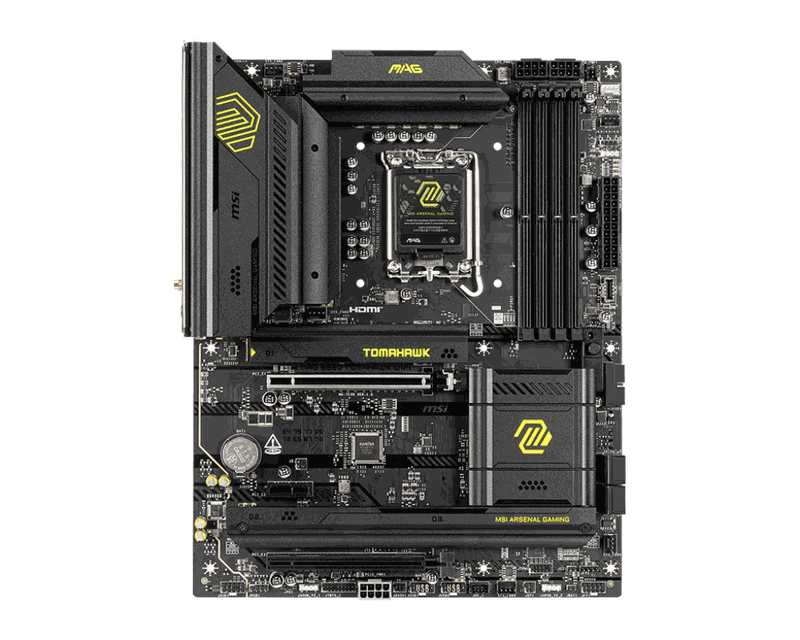
MSI MAG B860 Tomahawk WiFi
ATX B860 board for LGA1851 CPUs, DDR5 memory, BIOS Flashback included.
Tomahawk lineage for LGA1851. Strong VRM, BIOS-rich. If you're committed to Core Ultra, this is the value pick.
Official India stock. Full warranty through the brand's India service network, standard RMA if anything goes wrong.
Full specs
Compatible CPUs
DDR5 memory kits
Where to buy MSI MAG B860 Tomahawk WiFi in India
Expect to pay roughly ₹22,400-24,700 for the MSI MAG B860 Tomahawk WiFi in India right now, depending on offers and seller. I always recommend buying from retailers that give a proper GST invoice - it's what makes your India warranty claim smooth later.
Affiliate links on linked vendors - your price stays the same. PrimeABGB shown for comparison only.
In my years running a PC store, PrimeABGB (Mumbai) and Vedant Computers (Kolkata) have also been consistently reliable for verified stock - compare before buying.
MSI MAG B860 Tomahawk WiFi Review India 2025 - The Value Flagship for Arrow Lake
The Tomahawk on Arrow Lake - MSI's Sensible B860 ATX
The Tomahawk name has earned its reputation on Intel and AMD platforms alike. MSI builds these boards to hit the value point where you are not compromising on the features that matter while cutting the ones that only matter to overclockers. The MAG B860 Tomahawk WiFi at ₹23,309 (indicative) is the ATX B860 flagship for LGA1851 Arrow Lake builds that want a serious foundation without Z890 pricing.
What the Tomahawk Delivers on B860
The B860 Tomahawk WiFi carries 14+2+1 VRM phases using 60A SPS (Smart Power Stage) controllers - solid for Core Ultra 5 and Core Ultra 7 CPUs at Intel's specified power limits. The board is designed to handle the Core Ultra 7 265K's 125W PL1 and 253W PL2 spikes without thermal issues when using a 240mm AIO or better. Sustained Cinebench R23 multi-thread on the 265K runs cleanly on this board - no VRM throttling in normal operation.
Three M.2 slots is the headline feature at this price: the primary slot is PCIe 5.0 x4 (for Gen 5 SSDs), the second is PCIe 4.0 x4, and the third is PCIe 4.0 x4. All three slots have thermal shields. WiFi 6E covers 2.4/5/6 GHz tri-band. 2.5G LAN for wired connectivity. The rear I/O has a solid complement of USB ports including USB 3.2 Gen 2x2 (20Gbps Type-C).
The ATX form factor gives you more PCIe slots than the mATX B860M boards - useful for multi-GPU storage configs (PCIe NVMe adapters), sound cards, or capture cards. For most gaming builds, the extra slots are spare, but they are there when you need them.
India Pricing and Availability
MDComputers stocks the MAG B860 Tomahawk WiFi at ₹20,500–24,500. PrimeABGB and Vedant Computers carry it in the same range. Amazon India lists it at ₹22,000–26,000. Flipkart occasionally runs bank offers that bring it to ₹19,500–21,000 during sales - at that price, it is exceptional value for an ATX LGA1851 board.
MSI distributes through Rashi Peripherals in India - three-year warranty, with authorised service centres in Bangalore, Delhi, Mumbai, Chennai, Kolkata, and Hyderabad. The Tomahawk series has a strong track record for reliability, and MSI's RMA process on higher-priced boards has been smoother than on their budget lines in my experience.
Who Should Buy This Board
The B860 Tomahawk WiFi is the right call for Core Ultra 7 265K and 265KF builds at ₹23,309–1,50,000 total. The ATX form factor fits standard mid-tower cases. WiFi 6E handles wireless needs. The PCIe 5.0 M.2 slot future-proofs the primary SSD slot. If you are building a clean gaming or workstation system around an Arrow Lake Core Ultra 7 and you are not planning to overclock the CPU multiplier, this board gives you everything you need.
Skip it for Core Ultra 9 285K overclocking - the VRM, while solid, is not the right tool for sustained 300W+ OC sessions. Step to the Z890 Aorus Elite AX or Z890 Aorus Pro ICE at that point. Also skip it if mATX is a firm requirement for your case - the B860M Gaming WiFi at ₹16,000–21,000 fits smaller cases for ₹4,000–5,000 less.
Price we have actually seen
Down 1.6% since we started tracking. Every point is a price our crawler recorded at an Indian retailer - no estimates, no MSRP. Tracking began recently, so the window grows week by week.
Questions
No. CPU multiplier overclocking is locked, but gaming performance is determined by per-core boost speed, which the Core Ultra 7 265K achieves on any chipset within Intel's Boost specification. The Z890 unlocks overclocking headroom above those boost clocks. For gaming at 1440p and 4K where the GPU is the limiter, the B860 and Z890 boards produce identical frame rates. The gap only appears in fully CPU-limited workloads at high thread counts with overclocked CPUs.
The board supports XMP 3.0 up to the rated kit speeds. DDR5-7200 kits are technically in spec, but high-speed memory stability on Arrow Lake depends heavily on the specific memory kit and its JEDEC sub-timings. Stick to DDR5-6000 or DDR5-6400 kits from the QVL list for reliable daily use. Kingston Fury Beast and Corsair Vengeance DDR5-6000 are well-tested on this board.
Not urgently. PCIe 5.0 SSDs like the Samsung 9100 Pro are faster in sequential read/write but make no measurable difference in game load times or application responsiveness compared to a PCIe 4.0 SSD. The slot is there for future compatibility. Buy a PCIe 4.0 SSD now (Samsung 990 Pro, WD Black SN850X) and upgrade the SSD later if Gen 5 prices drop and the use case justifies it.