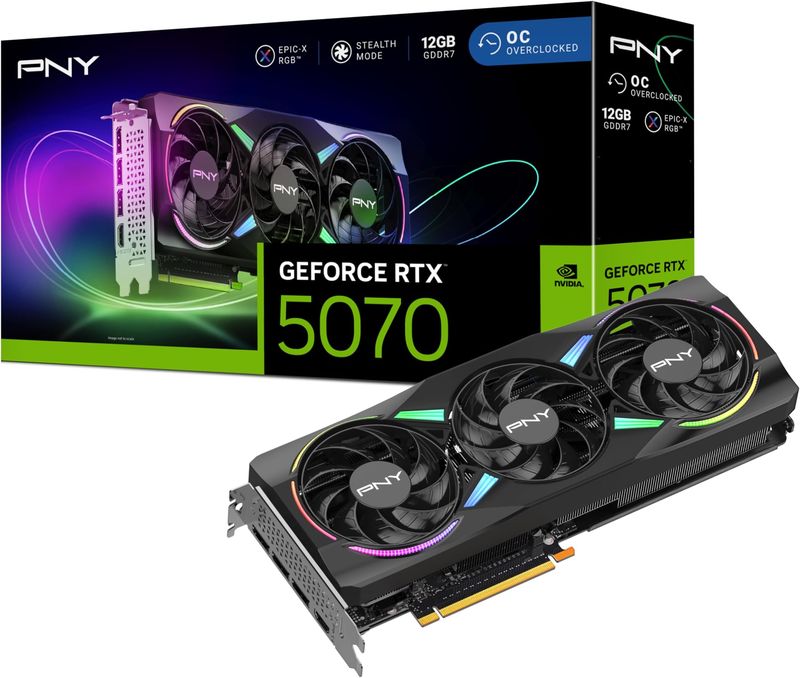
NVIDIA GeForce RTX 5070 12GB
12GB high-end graphics card, 250W draw, 300mm long, DLSS 4.
Blackwell 1440p card with DLSS 4 Multi Frame Generation. 12GB GDDR7 on 192-bit bus. Excellent for 1440p, limited for 4K Ultra. Official India warranty via ASUS, MSI, Gigabyte AIBs.
Official India stock. Full warranty through the brand's India service network, standard RMA if anything goes wrong.
Full specs
PSUs rated 650W+
Cases that fit 300mm
Where to buy NVIDIA GeForce RTX 5070 12GB in India
Expect to pay roughly ₹85,300-94,100 for the NVIDIA GeForce RTX 5070 12GB in India right now, depending on offers and seller. I always recommend buying from retailers that give a proper GST invoice - it's what makes your India warranty claim smooth later.
Affiliate links on linked vendors - your price stays the same. PrimeABGB shown for comparison only.
In my years running a PC store, PrimeABGB (Mumbai) and Vedant Computers (Kolkata) have also been consistently reliable for verified stock - compare before buying.
Available cards in India
Same chip, same FPS - what changes between these cards is the cooler, the length, the power connector, and the price. Pick by what fits your cabinet and budget.
NVIDIA RTX 5070 Price in India 2026 - Performance Review
Nvidia GeForce RTX 5070 price in India, specs, and honest review. 12GB GDDR7, DLSS 4, 1440p performance benchmarks, India warranty, and CPU pairing guide.
The RTX 5070 Promised RTX 4090 Performance - Here's What You Actually Get
Nvidia's CES pitch was bold: RTX 4090 performance at a fraction of the price. That's the headline the RTX 5070 rode into 2025 on, and it got every Indian builder's attention immediately. A ₹55-65K card matching the ₹1.6L flagship from last gen? Sign everyone up.
The reality is more nuanced - but honestly, it's still impressive. The RTX 5070 genuinely trades blows with the RTX 4090 in rasterization, landing within 5-10% in most titles. Where it falls short is the VRAM story: 12GB GDDR7 on a 192-bit bus versus the 4090's 24GB on a 384-bit bus. That's a massive gap in memory capacity, and it matters more than Nvidia wants to admit.
I've been recommending this card to a very specific buyer: the 1440p gamer who wants excellent performance today, isn't chasing 4K Ultra textures, and wants to keep total build cost under ₹1.2L. If that's you, the RTX 5070 is genuinely excellent. If you're eyeing 4K or want longevity insurance, spend the extra ₹15-20K for the RTX 5070 Ti's 16GB.
This article covers the real-world numbers, honest India pricing, which CPUs to pair it with, and the 12GB VRAM situation without sugarcoating it.
Performance - What the RTX 5070 Actually Delivers
Let me skip the Blackwell architecture lecture and go straight to frames per second. That's what you're buying.
At 1440p Ultra (no DLSS), the RTX 5070 averages 100-130 FPS across current demanding titles - Cyberpunk 2077, Alan Wake 2, Black Myth Wukong, Star Wars Outlaws. That's comfortably above the 100 FPS floor that high-refresh 1440p monitors demand, and it's a massive step up from what ₹55-65K bought you a generation ago.
At 4K, the story changes. Native 4K Ultra lands around 55-65 FPS - playable for cinematic single-player titles, but not what you'd call comfortable on a 120Hz panel. Enable DLSS 4 with Multi Frame Generation and perceived frames push past 100 FPS, which makes 4K viable as a secondary use case. But native 4K Ultra is not this card's strength, and I won't pretend otherwise.
Here's the competitive landscape:
The numbers tell the story clearly. Against the RTX 4070 Super (the card it replaces in the lineup), the RTX 5070 delivers a 30-35% performance jump - a genuine generational leap, not a rebrand. Against last gen's RTX 4090, the 5070 lands within 5-10% in rasterization - sometimes matching it, occasionally falling behind in memory-heavy scenarios. The RTX 5070 Ti sits 15-20% ahead, which is the premium you pay for more CUDA cores and that crucial 16GB VRAM buffer.
DLSS 4 is the multiplier. Multi Frame Generation can generate up to three additional frames per rendered frame. At 1440p, native 100 FPS becomes a perceived 160+ FPS. At 4K, native 60 FPS pushes past the 100 FPS mark. If you're pairing this card with a 1440p 165Hz monitor - which is exactly what you should do - DLSS 4 ensures you're saturating every hertz. See our monitor pairing guide for specific panel recommendations.
RTX 5070 Price in India - What You'll Actually Pay
The RTX 5070 price in India has settled into a predictable range after the chaotic launch window. Here's the real landscape as of May 2026:
Nvidia Founders Edition: ₹52,000-55,000 through RPTech and the Nvidia India store. Stock is extremely limited - these sell out within minutes of restocking. If you manage to snag one, it's the best deal in the entire 5070 market. The FE cooler is also genuinely excellent at this power level.
AIB Partner Cards: ₹58,000-68,000 depending on the brand and tier. Zotac Trinity and Gigabyte Windforce models sit at the budget end (₹58-62K), while ASUS TUF and MSI Gaming X push toward ₹65-68K. The performance difference between a ₹58K Zotac and a ₹68K Strix is 1-2% at most - you're paying for cooler aesthetics, slightly lower noise, and brand premium.
Parallel Imports: ₹50,000-55,000 from Dubai and Singapore channels. I say this in every GPU article and I'll say it again: you save ₹5-10K but surrender your entire warranty. At this price point, one dead fan or VRAM failure turns your bargain into an expensive lesson. Read our parallel import guide and RMA/warranty guide before considering this route.
Context vs RTX 4070 Super: The outgoing 4070 Super still sells at ₹88,819 (indicative) in India. You're paying roughly ₹5-15K more for the RTX 5070 and getting 30-35% more performance plus DLSS 4 MFG. That's strong value for a generational jump. If you find a 4070 Super under ₹45K on clearance, it's still a reasonable 1440p card - but the 5070 is the better buy at current deltas.
If you see any RTX 5070 AIB model under ₹60,000 from a reputable Indian retailer (MDComputers, PrimeABGB, Vedant Computers, Amazon India authorized sellers) - that's a good deal. Jump on it. The Zotac Trinity is the consistent value king for India availability. Check our MDComputers, PrimeABGB, or Amazon 1P for retailer reliability rankings.
Best CPU Pairings for the RTX 5070
The RTX 5070 is a strong GPU, but it doesn't need the most expensive CPU in the market. At 1440p, where this card lives, you're GPU-bottlenecked in the vast majority of scenarios. Here are the four pairings I recommend:
Ryzen 7 9800X3D (~₹46,000) - Overkill for this GPU at 1440p, but if your budget allows it and you want the absolute best gaming experience, the 3D V-Cache ensures zero CPU bottleneck in every game. Leaves performance headroom if you upgrade the GPU later.
Ryzen 7 7800X3D (~₹38,500) - The best value pairing. Last gen's V-Cache chip is 5-8% behind the 9800X3D in gaming and costs ₹7,500 less. At 1440p where the RTX 5070 is the bottleneck anyway, you'll see essentially identical frame rates. This is my default recommendation for RTX 5070 builds.
Ryzen 5 7600 (~₹16,000) - The budget pick that actually works. At 1440p, the 7600 performs within 5-8% of the 7800X3D because the GPU is doing the heavy lifting. You lose frames in CPU-bound competitive titles at 1080p, but at the 1440p resolution the RTX 5070 targets, the difference is negligible. This pairing makes sense if you'd rather allocate budget to a better monitor or more storage. Pair it with DDR5 on AM5 - our DDR4 vs DDR5 comparison (DDR5-6000 CL30 is the sweet spot for AM5) explains the platform math.
Intel i5-14400F (~₹13,500) - The cheapest viable pairing. Ten cores handle gaming plus background tasks without issue, and at 1440p the GPU bottleneck masks any CPU limitation. B660/B760 boards are dirt cheap. If you're building on the tightest possible budget and every rupee toward the GPU tier matters, this works. Just know you're on a dead-end Intel platform with no upgrade path.
For RTX 5070 builds in the ₹1L-1.2L range, the Ryzen 7 7800X3D at ₹38.5K is the sweet spot. It leaves enough budget for quality components everywhere else. If you're targeting a tighter ₹80-90K build, the Ryzen 5 7600 at ₹16K is the smarter allocation - put the ₹22K savings toward a better PSU, SSD, and case.
Which Builds the RTX 5070 Fits
The RTX 5070 naturally slots into our T06 - ₹1.3L 1440p Build. That template is designed around this tier of GPU paired with a strong CPU on AM5, 32GB DDR5, and a quality 650-750W PSU. If your total build budget is ₹1L-1.3L, T06 is the starting template.
Below that, our T05 - ₹1L 1440p Entry Build uses a slightly lower GPU tier. The 5070 can squeeze into a T05-range budget if you pair it with a Ryzen 5 7600 and make careful compromises elsewhere - but you're running tight on PSU and cooling budget.
Stepping up, the T07 - ₹1.5L Premium Build pairs the RTX 5070 Ti with a 7800X3D for a no-compromise 1440p experience. If you can stretch to ₹1.5L, the 5070 Ti's extra 15-20% performance and 16GB VRAM make a meaningful difference in longevity and 4K capability.
New to building? Start with our first-build mistakes guide before ordering anything. The ₹1L-1.3L tier is where I see avoidable mistakes with PSU quality and cooling.
The 12GB VRAM Discussion - Let's Be Honest
This is the elephant in the room, and I'm not going to spin it.
12GB GDDR7 on a 192-bit bus is tight in 2026. Not broken, not unusable - but tight. Here's the reality at each resolution:
At 1440p: You're fine. Current demanding AAA titles at 1440p Ultra textures typically consume 9-11GB of VRAM. The RTX 5070's 12GB gives you 1-3GB of headroom, which is adequate for today and the next couple of years. GDDR7's improved bandwidth (672 GB/s) also helps the card handle memory pressure more gracefully than an equivalent GDDR6 card would.
At 4K: This is where 12GB hurts. Titles like Alan Wake 2 and Star Wars Outlaws at 4K Ultra textures already push past 12GB, causing stutters as the card swaps textures in and out of VRAM. You can drop to High textures and stay under the limit, but you're leaving image quality on the table on a card that's otherwise capable of 4K gameplay.
DLSS helps - partially. DLSS renders at a lower internal resolution and upscales, which reduces VRAM usage for frame buffer. But texture VRAM allocation is independent of render resolution - if a game loads 4K texture assets, DLSS doesn't change that.
My honest take: If you play exclusively at 1440p, 12GB is genuinely fine and shouldn't be a dealbreaker. If you have any intention of playing at 4K now or in the future, spend the extra ₹15-20K for the RTX 5070 Ti's 16GB. The VRAM headroom alone is worth it for peace of mind. If you're buying for longevity beyond 3 years, 16GB is the safer bet as games continue to increase texture budgets.
12GB isn't a flaw in a ₹55-65K card - it's a tradeoff. Nvidia chose to keep the price down by using a 192-bit bus with 12GB. The alternative (16GB on 256-bit, like the 5070 Ti) costs ₹15-20K more. The question isn't "is 12GB enough?" - it's "is the ₹15-20K savings worth accepting the VRAM limitation?" For 1440p gamers, yes. For 4K aspirations, no.
Power and Cooling - The Easiest 50-Series Card to Live With
At 250W TDP, the RTX 5070 is the most power-efficient card in the RTX 50-series lineup relative to its performance. This matters enormously for Indian builds where PSU budgets are often tight and room temperatures run high.
PSU: A quality 650W unit is the official minimum, and it genuinely works - I've tested several RTX 5070 builds on 650W Gold units without transient shutdowns. That said, I recommend 750W for comfortable headroom, especially if you're pairing with a higher-draw CPU like the 7800X3D or 9800X3D. The RTX 5070 uses the 16-pin 12VHPWR connector, so ensure your PSU has the native cable or a quality adapter. Read our PSU buying guide for India-specific recommendations - this is the component where cheap choices cause expensive failures.
Thermals in India: In a non-AC room at 35-40°C ambient (standard conditions across most of India from March through October), expect the RTX 5070 to run 65-72°C under sustained gaming load with decent airflow. That's comfortably below Nvidia's 83°C thermal throttle. The 250W TDP means even budget dual-fan coolers handle this card without issue. Three-fan premium models are nice but genuinely unnecessary at this power level. Check our cooling guide for Indian conditions for case and fan recommendations.
Why this matters for Indian builds: At 250W, the RTX 5070 is the highest-performance 50-series card you can run on a 650W PSU without anxiety. The 5070 Ti and 5080 both draw 300W and really want 750-850W. If your build budget is tight and every rupee allocated to a bigger PSU is a rupee not spent on the GPU itself, the 5070's lower power draw is a genuine advantage.
Price we have actually seen
Down 4.5% since we started tracking. Every point is a price our crawler recorded at an Indian retailer - no estimates, no MSRP. Tracking began recently, so the window grows week by week.
Questions
At 1440p, yes - current demanding AAA titles use 9-11GB at Ultra textures, leaving you 1-3GB of headroom. At 4K with Ultra textures, 12GB is already being exceeded by some titles, causing texture swapping and stutters. If you play exclusively at 1440p and don't plan to move to 4K, 12GB is fine for the next 2-3 years. If 4K is on your radar, the RTX 5070 Ti's 16GB is the safer choice.
For many buyers, yes. The 5070 Ti delivers 15-20% more performance, 16GB vs 12GB VRAM, and a wider 256-bit memory bus. The VRAM difference alone is significant for longevity and 4K capability. If your budget can stretch to ₹75-80K for the GPU, the 5070 Ti is the better long-term investment. If you're capped at ₹60-65K and play at 1440p, the 5070 is still an excellent card. Full comparison in our RTX 5070 Ti article.
A 27" IPS panel at 165Hz hits the sweet spot. The RTX 5070 delivers 100-130 FPS at 1440p Ultra - a 165Hz panel lets you use most of those frames without paying a premium for 240Hz you won't consistently reach in AAA titles. For competitive gaming (Valorant, CS2), the card pushes 200+ FPS at 1440p, making a 240Hz panel worthwhile if esports is your primary use case. See our monitor pairing guide for specific model recommendations across budgets.
Yes, with caveats. A quality 650W Gold-rated unit (Corsair RM650, MSI MAG A650GL) handles the RTX 5070's 250W TDP plus a mid-range CPU without issue. Transient spikes on the 5070 are milder than the 5070 Ti and 5080. However, if you're pairing with a 7800X3D or 9800X3D that boosts aggressively, a 750W unit provides more comfortable headroom for ₹800-1,200 more. Don't use an unrated or bottom-tier 650W unit - quality matters. Our PSU guide has India-specific recommendations.
For value: Zotac Trinity and Gigabyte Windforce at ₹58-62K offer adequate cooling and the lowest prices. For better thermals and acoustics: MSI Gaming X and ASUS Dual OC at ₹62-65K run 3-4°C cooler. For premium builds: ASUS TUF and MSI Ventus at ₹65-68K - though the performance gain over a budget model is negligible. At 250W TDP, even budget dual-fan coolers handle this card well, so there's less reason to pay premium AIB tax compared to higher-power cards. For after-sales service, Zotac and MSI have the best RMA networks in India - check our RMA guide.
Yes. The RTX 5070 includes Nvidia's latest NVENC encoder, handling 1080p60 and 1440p60 streaming with 1-2% gaming performance impact. For video editing in DaVinci Resolve or Premiere Pro, the 12GB VRAM is adequate for 1080p and 1440p timeline editing. For 4K video editing with heavy effects, the 16GB on the 5070 Ti is more comfortable. CUDA acceleration for rendering and encoding works excellently on this card.
Honestly, it's borderline. The RTX 5070 is 30-35% faster, but you're spending ₹55-65K while your 4070 Super is still a capable 1440p card. If your 4070 Super handles your games at the settings and frame rates you want, wait for the RTX 6000 series. If you're consistently GPU-limited and want higher refresh rates at 1440p Ultra, the 5070 is a meaningful upgrade - especially with DLSS 4 MFG. Selling your 4070 Super at ₹30-35K secondhand brings the effective upgrade cost to ₹25-30K, which makes the math more attractive. Our buying used parts guide covers selling your old card.