
Gigabyte X870 Gaming WiFi6
ATX X870 board for AM5 CPUs, DDR5 memory, BIOS Flashback included.
ATX AM5 board with WiFi 6, 2.5GbE and two rear USB4 ports. Primary M.2 supports Gen5 with Ryzen 7000/9000 and Gen4 with Ryzen 8000; populating M2C_SB narrows M2B_SB to x2.
Catalogue classification: official India distribution. This does not verify a retailer's current stock. Confirm the exact model, invoice and applicable India warranty with the seller or brand.
Full specs
Compatible CPUs
DDR5 memory kits
Where to buy Gigabyte X870 Gaming WiFi6 in India
Indicative catalogue range: ₹20,000-22,000 for the Gigabyte X870 Gaming WiFi6. This is not a verified current retailer price. Confirm price and availability with the seller and buy with a proper GST invoice for warranty claims.
Affiliate links on linked vendors - your price stays the same. PrimeABGB shown for comparison only.
Compare the exact model, current availability, invoice and written warranty terms before paying. A retailer link or catalogue label does not verify the stock you will receive.
Gigabyte X870 Gaming WiFi6 Review: USB4 Matters More Than the Chipset Badge
Buy the USB4 connection you need. Check what happens when the third SSD goes in.
An ATX AM5 build with a real USB4 peripheral or dock requirement.
Two rear USB4 ports, three M.2 sockets and Q-Flash Plus.
WiFi 6 rather than 6E/7; the two chipset SSD sockets share bandwidth.
Specification-based buying assessment, not a hands-on performance test.
Buy it for a connection you will use
The X870 Gaming WiFi6 is an ATX AM5 option for someone who actually needs USB4 or wants a particular storage layout. It is not automatically a better gaming purchase than a less expensive B650 board. For a single graphics card and one ordinary NVMe drive, an unused premium interface is money that could stay in the GPU budget.
Before moving up to X870, write down the devices you plan to connect. A USB4 external SSD or compatible dock is a tangible reason; the expectation that a more expensive chipset creates more FPS is not.
Exact model and wireless limitation
Gigabyte's revision 1.x specifications identify four DDR5 sockets, three storage M.2 connectors, four SATA ports, two rear USB4 Type-C ports, 2.5GbE and Q-Flash Plus. Revision 1.0 lists Realtek RTL8851BE WiFi 6 with 80MHz support and Bluetooth 5.3. It is not WiFi 6E or WiFi 7.
The primary SSD slot can use Gen5 with Ryzen 7000/9000 processors. The chipset-connected M2C_SB is Gen4 x2; installing an SSD there reduces M2B_SB to x2. Three slots therefore do not mean three independent full-width Gen4/Gen5 links. Ryzen 8000 processors also change the CPU-connected graphics and storage links.
| Feature | What to plan for |
|---|---|
| Platform | AM5 / X870 · ATX, 30.5 × 24.4 cm |
| Memory | Four DDR5 sockets |
| CPU SSD | M2A_CPU: up to Gen5 x4 with Ryzen 7000/9000 |
| Chipset SSDs | M2B_SB: up to Gen4 x4 · M2C_SB: up to Gen4 x2 |
| Sharing rule | Populate M2C_SB → M2B_SB operates at up to x2 |
| Network / USB | WiFi 6 on rev. 1.0 · 2.5GbE · two rear USB4 ports |
Interface ratings are not measured results. Exact-model specification →
Think through the drive layout
For a boot drive plus one secondary NVMe SSD, the sharing condition may never enter your daily use. For three SSDs and heavy simultaneous file transfers, it is a real planning consideration. Check the manual's connector labels before installing drives; do not rely on a retailer's simplified “three M.2” bullet.
Separate the need for a Gen5 slot from the need for a Gen5 SSD. A game library is not automatically worth a storage premium, while a sustained-transfer workload may have different priorities. Account for SSD cooling and external-drive capabilities before spending.
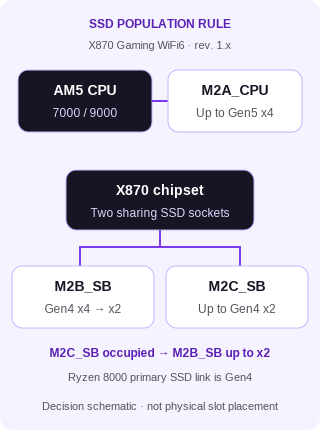
Three sockets are not three independent full-width links
M2A_CPU is the CPU-connected socket; Ryzen 7000/9000 supports up to Gen5 x4. Ryzen 8000 uses a Gen4 link.
With M2C_SB empty, M2B_SB supports up to Gen4 x4. Installing a PCIe SSD in M2C_SB changes M2B_SB to up to x2; M2C_SB itself is up to Gen4 x2.
Compare the Gaming X WiFi7 for newer wireless hardware. USB4 on this model does not change its WiFi 6 radio.
When the WiFi6 version is the wrong choice
If your main reason for buying a new board is improved wireless networking, compare the Gaming X WiFi7 or another model with the required radio specification. This board's USB4 and chipset do not upgrade its WiFi module. Ethernet remains an option when a cable is practical.
An ATX case is required. Check which expansion positions remain usable below the planned GPU and route the case's USB-C cable before installing a large card. Q-Flash Plus provides a firmware-update path, not permission to use another model's BIOS.
Confirm that the dock or external drive actually needs USB4.
Read M2A_CPU, M2B_SB and M2C_SB labels before populating all three.
WiFi 6 and ATX fit must suit the desk and chassis.
Verdict
Choose this exact model if its USB4 ports and ATX connectivity justify the total build cost and the SSD-sharing layout fits your plan. Skip it if you only need basic AM5 gaming connectivity or specifically want newer wireless hardware. This is a manufacturer-documentation assessment, not thermal testing; no fresh retailer price or guaranteed overclock is asserted.
Price we have actually seen
Hover or tap the chart for a recorded price. Use ← → when focused.
View all recorded prices
| Date | Price |
|---|---|
| ₹20,239 | |
| ₹20,239 | |
| ₹20,239 | |
| ₹20,239 | |
| ₹20,239 | |
| ₹20,239 | |
| ₹20,237 | |
| ₹20,237 | |
| ₹20,237 | |
| ₹20,237 | |
| ₹20,237 | |
| ₹20,229 | |
| ₹20,229 | |
| ₹20,229 | |
| ₹20,229 | |
| ₹20,229 | |
| ₹20,229 | |
| ₹20,229 | |
| ₹20,229 | |
| ₹20,229 | |
| ₹20,229 | |
| ₹20,229 | |
| ₹20,229 | |
| ₹20,229 | |
| ₹20,229 | |
| ₹20,229 | |
| ₹20,229 | |
| ₹20,229 | |
| ₹20,229 | |
| ₹20,229 |
Down 0.0% since we started tracking. Every point is a price our crawler recorded at an Indian retailer - no estimates, no MSRP. Tracking began recently, so the window grows week by week.
Questions
Ratings & comments
Reviews & comments
Share your experience or ask a question about this part.