
Gigabyte X870 Gaming X WiFi7
ATX X870 board for AM5 CPUs, DDR5 memory, BIOS Flashback included.
ATX AM5 board with revision-dependent WiFi 7, 2.5GbE and two rear USB4 ports. Primary M.2 supports Gen5 with Ryzen 7000/9000 and Gen4 with Ryzen 8000; populating M2C_SB narrows M2B_SB to x2.
Catalogue classification: official India distribution. This does not verify a retailer's current stock. Confirm the exact model, invoice and applicable India warranty with the seller or brand.
Full specs
Compatible CPUs
DDR5 memory kits
Where to buy Gigabyte X870 Gaming X WiFi7 in India
Indicative catalogue range: ₹22,700-25,100 for the Gigabyte X870 Gaming X WiFi7. This is not a verified current retailer price. Confirm price and availability with the seller and buy with a proper GST invoice for warranty claims.
Affiliate links on linked vendors - your price stays the same. PrimeABGB shown for comparison only.
Compare the exact model, current availability, invoice and written warranty terms before paying. A retailer link or catalogue label does not verify the stock you will receive.
Gigabyte X870 Gaming X WiFi7 Review: Check the Radio Revision and SSD Lanes
USB4 and WiFi 7 are the buying reasons. Match the radio driver to the PCB revision.
An ATX AM5 desktop using USB4 and a compatible newer wireless setup.
Two rear USB4 ports, three M.2 sockets and 2.5GbE.
Radio hardware varies by revision; the chipset SSD links still share bandwidth.
Specification-based buying assessment, not a hands-on performance test.
What makes this model worth considering
The X870 Gaming X WiFi7 makes more sense for a build using high-speed external devices and modern wireless networking than for a bare-minimum gaming PC. Its useful features should be checked against the actual peripherals at your desk. Neither X870 nor WiFi 7 on the box guarantees a faster game on an unchanged internet connection.
For a new ATX AM5 build, shortlist it when you need those connections together. If you already use wired networking and have one SSD, compare a lower-cost board with the same essential CPU and memory support before paying for features you will leave unused.
The revision and slot details
Gigabyte's revision 1.x specification lists four DDR5 slots, three storage M.2 connectors, two rear USB4 Type-C ports and 2.5GbE. WiFi 7 hardware differs: revision 1.0 lists MediaTek MT7925, while revision 1.1 lists Realtek RTL8922AE. Match the revision when downloading wireless drivers.
M2A_CPU supports Gen5 with Ryzen 7000/9000; M2B_SB is Gen4 x4 and M2C_SB is Gen4 x2. The two chipset slots share bandwidth, with M2B_SB falling to x2 when M2C_SB is populated. Ryzen 8000 parts also change the main GPU link. Treat the connector count and the lane layout as separate buying criteria.
| Feature | What to plan for |
|---|---|
| Platform | AM5 / X870 · ATX |
| Memory / SATA | Four DDR5 sockets · four SATA ports |
| Storage | M2A_CPU up to Gen5 x4 with Ryzen 7000/9000; two Gen4 chipset sockets |
| Sharing rule | M2C_SB occupied → M2B_SB up to x2 |
| WiFi 7 radio | Rev. 1.0: MediaTek MT7925 · rev. 1.1: Realtek RTL8922AE |
| Wired / USB | 2.5GbE · two rear USB4 Type-C ports |
Interface ratings are not measured results. Exact-model specification →
Storage and expansion advice
A two-drive gaming PC may be perfectly comfortable with this arrangement. A workstation intended to move data between three NVMe drives should consider the sharing condition before purchase. Put the fastest or most demanding drive in the appropriate slot and read the manual before adding another.
A Gen5 graphics slot does not create a benefit for every graphics card. Select the card for your resolution and workload, then check the case's length, thickness and power-cable clearance. Full-size ATX provides more board space, but a wide GPU can still hide expansion positions.
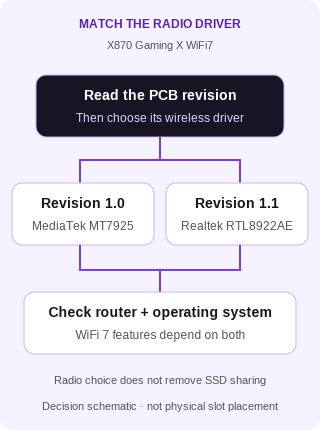
One product name, two radio support paths
Revision 1.0 lists a MediaTek MT7925 radio; revision 1.1 lists a Realtek RTL8922AE. Confirm the PCB revision before choosing drivers.
The router, operating system and local band availability affect usable WiFi 7 features. The label is not a measured internet-speed result.
The SSD-sharing rule is unchanged: installing in M2C_SB reduces M2B_SB to up to x2. Newer wireless does not remove that storage condition.
Wireless expectations
Use the supplied antennas and choose their position deliberately. WiFi 7's features depend on the router, client driver, operating system and local band availability. Do not infer unrestricted 6GHz operation from the radio label, and do not replace a stable wired connection solely because a newer number sounds better.
A seller advertising this board simply as “X870 Gaming” may be offering the different WiFi6 model. Confirm the full Gaming X WiFi7 name and the PCB revision on the invoice or box photograph.
Gaming X WiFi7 is different from Gaming WiFi6.
Match CPU BIOS and wireless support to the printed PCB revision.
Allow for the M2B_SB/M2C_SB sharing rule with three NVMe drives.
Verdict and evidence scope
This model earns consideration through combined USB4 and newer wireless connectivity, not through an assumed FPS advantage. Avoid paying its premium if a simpler board covers your drive and peripheral list. Check CPU/BIOS support and a matched DDR5 kit before assembly. This review uses exact-model manufacturer documentation and practical build planning; it is not hands-on benchmarking and does not refresh any retailer price.
Price we have actually seen
Hover or tap the chart for a recorded price. Use ← → when focused.
View all recorded prices
| Date | Price |
|---|---|
| ₹22,549 | |
| ₹22,549 | |
| ₹22,549 | |
| ₹22,549 | |
| ₹22,549 | |
| ₹22,549 | |
| ₹22,549 | |
| ₹22,549 | |
| ₹22,549 | |
| ₹22,549 | |
| ₹22,549 | |
| ₹22,549 | |
| ₹21,000 | |
| ₹22,549 | |
| ₹22,549 | |
| ₹22,549 | |
| ₹21,999 | |
| ₹21,999 | |
| ₹21,999 | |
| ₹21,999 | |
| ₹21,999 | |
| ₹21,999 | |
| ₹21,999 |
Down 2.4% since we started tracking. Every point is a price our crawler recorded at an Indian retailer - no estimates, no MSRP. Tracking began recently, so the window grows week by week.
Questions
Ratings & comments
Reviews & comments
Share your experience or ask a question about this part.