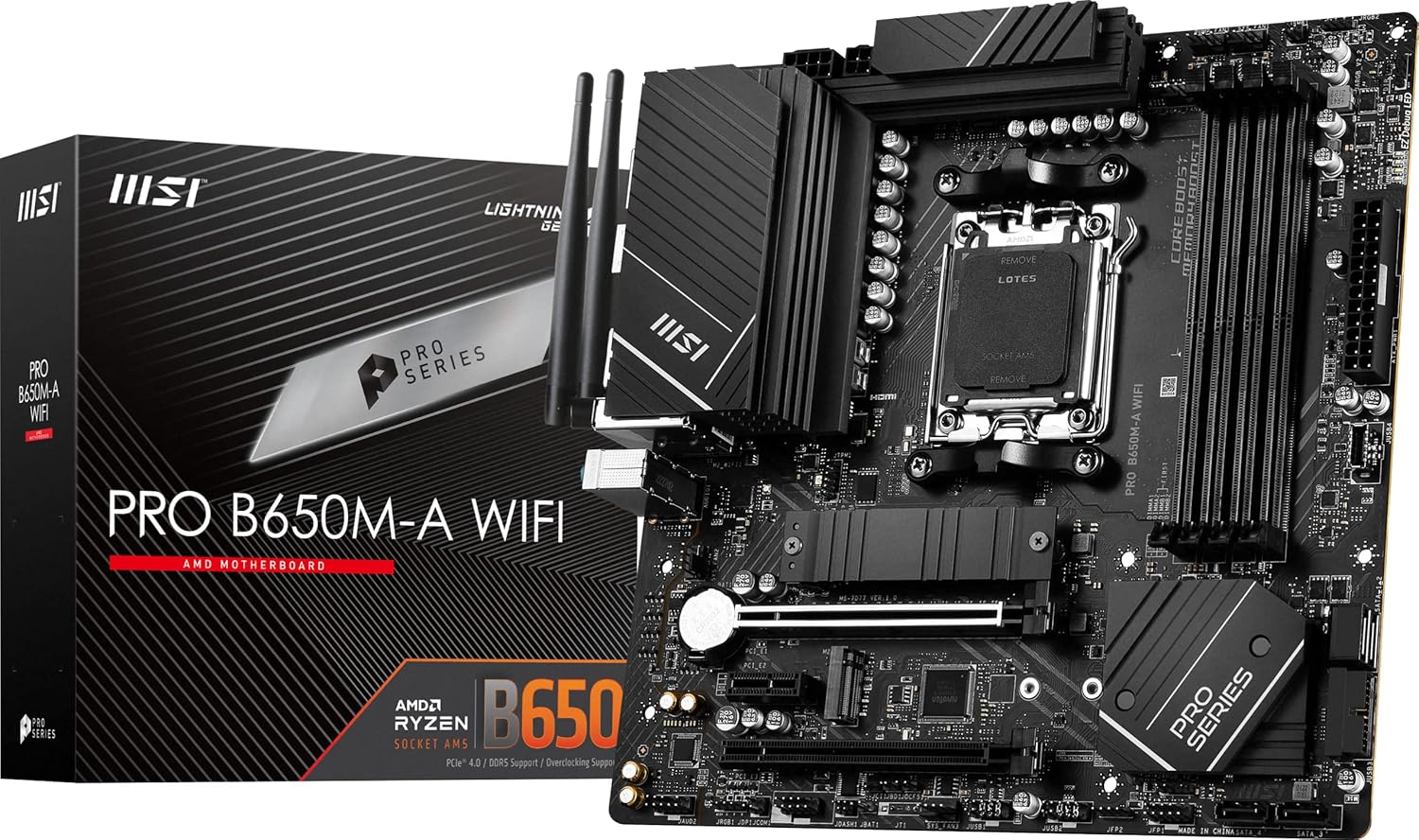
MSI PRO B650M-A WIFI
mATX B650 board for AM5 CPUs, DDR5 memory, BIOS Flashback included.
Solid entry-level AM5 mATX board. No BIOS Flashback — if buying for Ryzen 9000, get the board flashed before pickup.
Official India stock. Full warranty through the brand's India service network, standard RMA if anything goes wrong.
Full specs
Compatible CPUs
DDR5 memory kits
Where to buy MSI PRO B650M-A WIFI in India
Expect to pay roughly ₹13,400-14,800 for the MSI PRO B650M-A WIFI in India right now, depending on offers and seller. I always recommend buying from retailers that give a proper GST invoice - it's what makes your India warranty claim smooth later.
Affiliate links on linked vendors - your price stays the same. PrimeABGB shown for comparison only.
In my years running a PC store, PrimeABGB (Mumbai) and Vedant Computers (Kolkata) have also been consistently reliable for verified stock - compare before buying.
MSI B650M Pro WiFi Review India 2025 - Clean AM5 mATX for Productivity Builds
MSI's No-Nonsense AM5 mATX Board for Work-First Builds
The Pro series from MSI is intentionally different from the MAG gaming line. No RGB, no aggressive heatsink styling, no marketing language about "military-grade" components. The B650M Pro WiFi is a ₹14,000–18,000 mATX AM5 board designed for people who want a clean, functional system - professional workstations, home office builds, content creation rigs where the focus is uptime and stability rather than RGB sync and gaming aesthetic.
Pro Series vs MAG - What MSI Is Actually Selling You
MSI splits its consumer motherboard lineup into Pro (professional/productivity), MAG (gaming mid-range), and MPG (gaming enthusiast). The Pro designation means the board is tuned for reliability and clean operation rather than peak performance headroom. The B650M Pro WiFi uses a 10+2+1 VRM - adequate for Ryzen 5 7600, Ryzen 7 7700, and Ryzen 7 9700X at stock and at the default precision boost overdrive settings AMD enables.
The BIOS reflects this philosophy. MSI's Click BIOS on the Pro series removes the gaming-specific overlays and presents a cleaner, more business-oriented interface. Memory EXPO loading, fan control, and boot order are straightforward. The board does not have the deep overclocking menus of the MAG Tomahawk - but if you are not overclocking (and on B650, CPU multiplier OC is limited anyway), those menus are not needed.
Three M.2 slots is a notable win at this price: two PCIe 4.0 and one PCIe 3.0. Most productivity builds use two or three SSDs - one for Windows/macOS, one for projects, one for backup or archive. Having three M.2 slots without needing an add-in card is a genuine workflow advantage.
India Pricing and Availability
MSI's B650M Pro WiFi runs ₹14,500–17,500 at MDComputers and PrimeABGB. Vedant Computers in Kolkata has it in stock consistently. Amazon India prices it slightly higher at ₹14,000 (indicative) with Flipkart occasionally running it cheaper during sales.
MSI distributes the Pro series through Rashi Peripherals in India - three-year warranty, same as the gaming lineup. Rashi's warranty claim process for MSI boards requires the product serial number, purchase invoice with GST, and a photo of the defect. Claims are processed through authorised service centres in major cities; turnaround is typically 10–20 days for warranty replacements.
The Pro WiFi is not as widely stocked in tier-2 and tier-3 cities as the MAG gaming boards - retailers tend to keep gaming-branded stock since it sells faster. Order online from MDComputers or PrimeABGB if your local market does not carry it.
Who Should Buy This Board
The B650M Pro WiFi is the right board for home office builds, workstations, and any Ryzen 7 9700X or Ryzen 5 7600 system where the build aesthetic is clean rather than gaming-aggressive. Professionals who want a computer that looks like a computer - not like a gaming device - will appreciate the understated design. The three M.2 slots serve productivity users well.
Skip it if you want WiFi 6E - the Pro WiFi tops out at WiFi 6 (802.11ax), which covers 2.4/5 GHz but not the 6 GHz band. If your router supports WiFi 6E and you want that 6 GHz band for lower congestion, step to the MAG B650M Tomahawk WiFi or the Gigabyte B650M Aorus Elite AX. Also skip it if you are pairing it with a Ryzen 9 9950X - the VRM is undersized for that CPU's sustained power draw.
Price we have actually seen
Up 9.1% since we started tracking. Every point is a price our crawler recorded at an Indian retailer - no estimates, no MSRP. Tracking began recently, so the window grows week by week.
Questions
Yes. EXPO 1 and EXPO 2 profiles load cleanly in the Click BIOS. DDR5-6000 CL30 kits - the sweet spot for Ryzen 7000 and 9000 series performance - are well-supported. MSI's memory compatibility list for this board includes Corsair Vengeance DDR5, G.Skill Ripjaws S5, and Kingston Fury Beast DDR5 kits.
No - if anything, it is easier for non-gamers. The Click BIOS on the Pro series removes gaming-specific overlays and presents straightforward menus for fan control, memory profiles, and boot options. The advanced overclocking tabs are still present for those who want them. First-time builders will find the Pro BIOS more navigable than Gigabyte's Aorus BIOS at a similar price point.
Three reasons to stay on the Pro WiFi: you do not care about WiFi 6E, you want the professional aesthetic, or you specifically need the ₹4,000 savings for a better component elsewhere in the build. The Tomahawk's advantages - stronger VRM, WiFi 6E, slightly better thermal headroom - only matter if you are pushing the CPU beyond default power limits or need the 6 GHz WiFi band. For Ryzen 5 7600 and 9700X at stock, the Pro WiFi handles them identically.