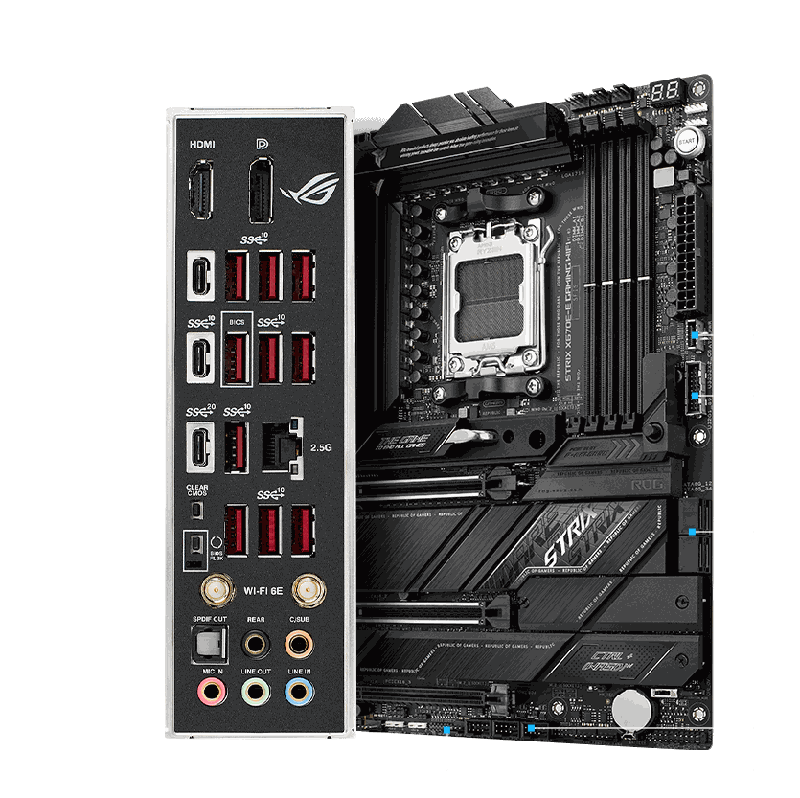
ASUS ROG Strix X670E-A Gaming WiFi
ATX X670E board for AM5 CPUs, DDR5 memory, BIOS Flashback included.
Enthusiast X670E with PCIe 5.0 across GPU and primary M.2. Pairs naturally with 9950X / 7950X3D for top-tier productivity rigs.
Official India stock. Full warranty through the brand's India service network, standard RMA if anything goes wrong.
Full specs
Compatible CPUs
DDR5 memory kits
Where to buy ASUS ROG Strix X670E-A Gaming WiFi in India
Expect to pay roughly ₹40,300-44,500 for the ASUS ROG Strix X670E-A Gaming WiFi in India right now, depending on offers and seller. I always recommend buying from retailers that give a proper GST invoice - it's what makes your India warranty claim smooth later.
Affiliate links on linked vendors - your price stays the same. PrimeABGB shown for comparison only.
In my years running a PC store, PrimeABGB (Mumbai) and Vedant Computers (Kolkata) have also been consistently reliable for verified stock - compare before buying.
ASUS ROG Strix X670E-A Gaming WiFi Review: Premium AM5 Motherboard India 2025
ASUS ROG Strix X670E-A Gaming WiFi: The Enthusiast AM5 Board That Earns Its Price
X670E is a meaningful spec, not just a marketing tier. The "E" mandates PCIe 5.0 on both the primary GPU slot and the primary M.2 slot - a guarantee you don't get on standard X670 boards where manufacturers have flexibility. The ASUS ROG Strix X670E-A Gaming WiFi delivers this with an 18+2 VRM configuration capable of handling Ryzen 9 9950X at full power without any thermal throttling concerns.
India price range: ₹35,000–42,000. This is the most expensive AM5 board I'd recommend to most enthusiast builders - beyond this, you're paying for features that serve extreme niche use cases.
The X670E Advantage in Plain Terms
Standard X670 boards give manufacturers a choice about which slots get PCIe 5.0. X670E removes that choice - both the primary GPU slot (x16) and the primary M.2 must run at PCIe 5.0. On the ROG Strix X670E-A, this means:
- Your RTX 5090 (or future GPU generation that actually saturates PCIe 5.0) won't be bottlenecked
- Your primary NVMe - whether a Crucial T705, Samsung 9100 Pro, or future Gen 5 drive - gets full PCIe 5.0 x4 bandwidth simultaneously with the GPU on PCIe 5.0 x16
- Three additional M.2 slots run PCIe 4.0, so you have four total storage devices without SATA involvement
The 18+2 power stages are the other differentiator. Running Ryzen 9 9950X at its 170W TDP with EXPO DDR5-6000 active, the VRM thermals on this board stay well-managed in a proper ATX case with two intake fans. Cheaper boards with 12+2 stages can throttle under sustained all-core workloads - this one doesn't.
Key specs:
- Socket: AM5 | Chipset: X670E
- Memory: DDR5, 4x slots, up to DDR5-8000+ (OC)
- VRM: 18+2 power stages
- M.2: 4x (1x PCIe 5.0 primary, 3x PCIe 4.0)
- WiFi: 6E | LAN: 2.5G Intel i226-V
- USB 4 Gen 2x2: 2x rear (40 Gbps)
- PCIe: 1x PCIe 5.0 x16 (GPU), 1x PCIe 4.0 x4
- ROG ecosystem: BIOS FlexKey, AI OC, Aura Sync
- Form factor: ATX
India Pricing and Availability
At ₹35,000–42,000, the ROG Strix X670E-A is near the top of what I'd call "defensible" AM5 spending for an enthusiast. ASUS India distribution runs through Acro Engineering, with solid warranty support. MDComputers and PrimeABGB both carry it; Amazon India also stocks it, though pricing is less stable there.
The ROG Premium Care warranty option (extending beyond standard 3 years) is available in India if you want it - worth considering for a board this expensive, especially given India's power quality variability.
Who Should Buy This
Ryzen 9 9950X and 9900X3D builds in the ₹2L–3L+ price tier. Content creators who need simultaneous PCIe 5.0 GPU and Gen 5 NVMe bandwidth for 4K/8K video timelines. Enthusiasts who want a board that can handle whatever Ryzen AM5 chips AMD releases in the next 2–3 years without breaking a sweat. The ROG ecosystem - BIOS FlexKey, AI Overclocking, Aura Sync - is genuinely well-implemented if you're already using ROG peripherals.
Who Should Skip This
Gaming-only builders. I'll repeat what I said about X670 generally: a Ryzen 7 9700X on a B850-F Gaming WiFi will post identical 1080p and 1440p gaming numbers. You're spending ₹15,000–20,000 more for connectivity and VRM headroom your gaming workload will never exercise. Get the B850, buy a better GPU with the savings.
Also skip it if you're an i9-14900K builder - this is AM5/AMD only.
Price we have actually seen
Down 0.0% since we started tracking. Every point is a price our crawler recorded at an Indian retailer - no estimates, no MSRP. Tracking began recently, so the window grows week by week.
Questions
The ROG X670E-A wins on VRM (18+2 vs 16+2) and PCIe 5.0 guarantees (X670E mandate vs X670 flexibility). The Gigabyte X670 is ₹7,000–10,000 cheaper in India and hits 90% of the use cases. If you're doing heavy overclocking or truly need maximum PCIe 5.0 assurance, the ROG is worth the premium. For most builders, the Gigabyte X670 is the smarter buy.
Yes. The ROG Strix X670E-A supports both AMD EXPO and Intel XMP 2.0 profiles. DDR5-6000 CL30 EXPO runs stably on first boot. You can push higher with manual tuning - DDR5-7200+ is achievable with premium kits like G.Skill Trident Z5 Neo.
FlexKey reprograms the Reset button on your case to function as a BIOS flashback trigger, safe boot button, or Aura lighting toggle. It's a minor quality-of-life feature, not a buying reason. Mentioned it because people ask - don't factor it into your purchase decision.